

Support
Freshdesk
Roiva prices the agent time your AI saves in Freshdesk, from tickets agents resolved and the minutes each takes, and books the tickets an AI agent resolves.
What it answers
How much agent time your AI support tools save, and what the tickets an AI agent resolves are worth
What Roiva reads
Tickets updated in the last 12 months, with their response and resolution times. Freshdesk sends each ticket's subject and requester; Roiva keeps only the fields it counts with.
Setup
An API key from an agent with Global Access, who can see every ticket
What you can measure with Freshdesk
Time agents save per ticket
For AI-drafted replies and routing: tickets agents resolved × the fall in agent minutes per ticket from a time study × your labor rate, as freed capacity.
freshdesk.tickets.agent_resolved_count
Starts from the AI Support Ticket Routing & Resolution template
Tickets your AI agent resolved
Counted by a rule you set, a tag or the agent a ticket was assigned to, less any the customer reopened or wrote back about within your recontact window, and priced per ticket.
freshdesk.tickets.resolved_count
Starts from the AI Support Ticket Routing & Resolution template
Every ticket, or say so
A key from an agent with Group Access sees only part of the desk, and Roiva would count only that part. The connection page checks the key and warns when it can't see everything.
Response time, tracked beside it
First response and resolution times against their baseline, never priced: the customer waiting less isn't agents working less.
freshdesk.tickets.avg_first_response_hours
freshdesk.tickets.avg_resolution_days
A worked month
AI-drafted replies for a twenty-agent support team
Agent Handle Time Freed Capacity, from the AI Support Ticket Routing & Resolution template, for September
| Tickets agents resolved in September | 3,200 | Freshdesk |
| Agent minutes per ticket before go-live | 14 | Your time study |
| Agent minutes per ticket in September | 10 | Your time study |
| Agent labor rate, an hour | $45 | Set by Finance |
3,200 tickets × (14 − 10) minutes ÷ 60 × $45
$9,600 freed capacity for September, reported beside cash ROI, never in it
Freshdesk records how long a ticket stayed open, not how long anyone worked it, so the minutes come from a time study. Tickets an AI agent resolved are left out here, so none counts twice.
Illustrative figures. Roiva keeps every input with the entry it calculates, and none of it counts until it's approved.
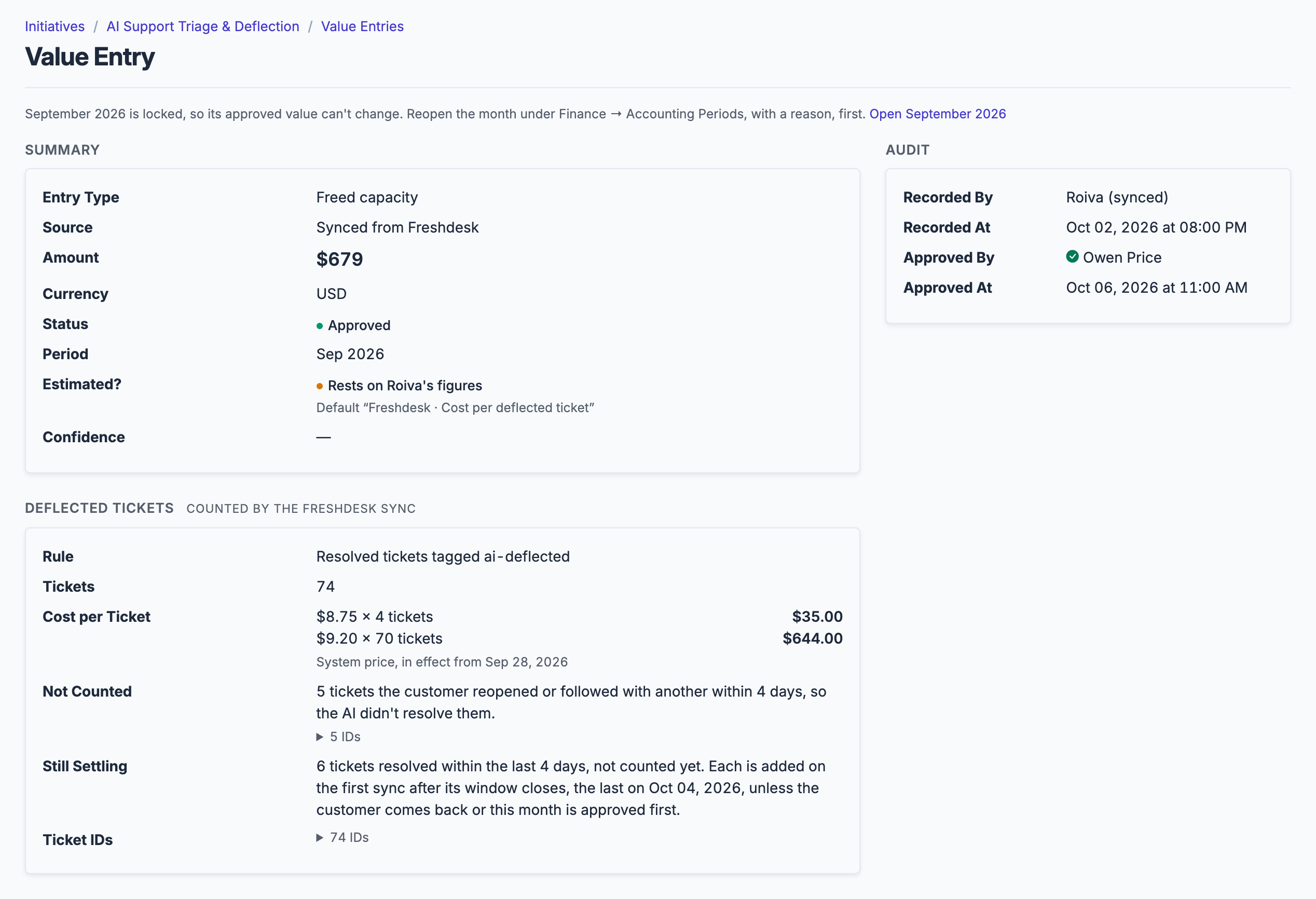
A month of deflection as Roiva books it: the rule, each price in effect that month, what's left out, and what's still inside the recontact window.
What gets synced
Roiva writes these metric observations on each sync. Reference the key in a value formula to use this data in your ROI calculations.
Tickets
freshdesk.tickets.volume
Ticket Volume
count
freshdesk.tickets.resolved_count
Resolved Ticket Count
count
freshdesk.tickets.agent_resolved_count
Tickets Resolved by Human Agents
count
freshdesk.tickets.avg_resolution_days
Avg Resolution Time (days)
duration
freshdesk.tickets.avg_first_response_hours
Avg First Response Time (hours)
duration
What Roiva keeps
Reads: Tickets updated in the last 12 months, with their response and resolution times, and the IDs of deleted and spam tickets so those can be removed. Freshdesk sends each ticket's subject and requester; Roiva keeps only the fields the field-by-field table lists.
Keeps: Records of tickets, plus the totals worked out from them.
How to connect
You connect Freshdesk from inside Roiva, so you need a Roiva workspace first. Sign in to connect it now. New to Roiva? Start free with your work email, take the free assessment and create your workspace at the end, or request an invite.
- In Freshdesk: Sign in as an agent with Global Access, who can see all tickets, then click your profile picture → Profile Settings → View API key, on the right. Freshdesk asks you to complete a captcha first, and shows the key only once the agent's account is verified. An agent with Group or Restricted Access sees only some tickets, and Roiva would count only those
- Back in Roiva: Enter your Freshdesk subdomain (the part before .freshdesk.com) in the Subdomain field
- Back in Roiva: Paste the API key and save the connection
- Back in Roiva: The connection page checks each step and says what's missing. Once it's all ticked, click Test Connection
- Back in Roiva: After connecting, link this connection to an initiative on the Initiatives tab
Need help?
Email hello@roiva.ai with what you're seeing, and you'll hear back within one business day.
Freshdesk
Start free, then connect Freshdesk once your workspace is set up. Or begin with the free AI ROI exposure assessment.
Start free → Sign in to connectRelated integrations

