
AI ROI your CFO will accept, with costs that tie out to your books.
Every dollar of value traces to its source and an approval. Closing the month can post journals tagging AI bills to the initiatives your allocation rules assign them to, in QuickBooks, NetSuite or Xero.
The problem
Vendors quote outsized ROI, spreadsheets don't survive turnover, and a dashboard your books have never seen doesn't survive an audit.
Worked example
One month of AI in accounts payable, line by line
Illustrative figures, not a customer's: an AP team on NetSuite with AI capturing, coding and matching vendor bills.
-
1
Price the AP time it freed
Bill volume comes from your accounting system. Minutes per bill come from a time study of your AP clerks before and after go-live, not from the vendor's case study.
Vendor bills this month, from NetSuite 4,200 Minutes per bill, before and after 11.5 → 3.5 AP cost per hour $40 Freed capacity $22,400 -
2
Count fewer errors once as time and once as money
A bill entered right the first time saves the hours spent fixing it, which is capacity. It also keeps money from going out the door, such as a duplicate payment that never comes back, which is cash. Two formulas split the same fall in the error rate, so nothing is counted twice.
Bills entered with an error, before and after 3% → 1% Errors avoided 84 Time to correct them, at $45 each: freed capacity $3,780 Money lost per error, from last year's recovery audit $180 Losses avoided: cash value $15,120 -
3
Count as cash only what a document shows
The AP team is paid the same, so freed time isn't cash. Agency temps you stopped paying for are, recorded for the month with the invoice cited, and never more than the capacity approved for that month.
Freed capacity, steps 1 and 2 $26,180 2 agency temps not renewed, agency invoice cited $12,400 Capacity not yet cash $13,780 -
4
Set it against everything the AI costs
Your NetSuite license isn't counted: you pay for it either way. The platform's bill reaches the initiative from your books through an allocation rule.
AP automation platform $7,500 Model usage for bill capture, from OpenAI's Admin API $1,100 AP lead reviewing exceptions: 30 hours × $55 $1,650 Total cost $10,250 -
5
Close the month and post it
Locking the month freezes its costs and approved value. With GL posting set up, it also posts a journal to NetSuite tagging the platform's bill to this initiative's department, and reopening, which takes a reason, posts its reversal. Either way the figure in this month's board pack only changes on the record.
Cash value: losses avoided and temps not renewed $27,520 Cost $10,250 Net cash, frozen at close $17,270
Priced as savings, the same month reads 303%. The difference is AP time no budget has shown yet.
None of it counts until a person approves it. A calculated figure keeps its versioned formula and a snapshot of its inputs, and a figure a person recorded keeps who recorded it and the document it cites. What makes a figure auditable →
What a reviewer sees in Roiva
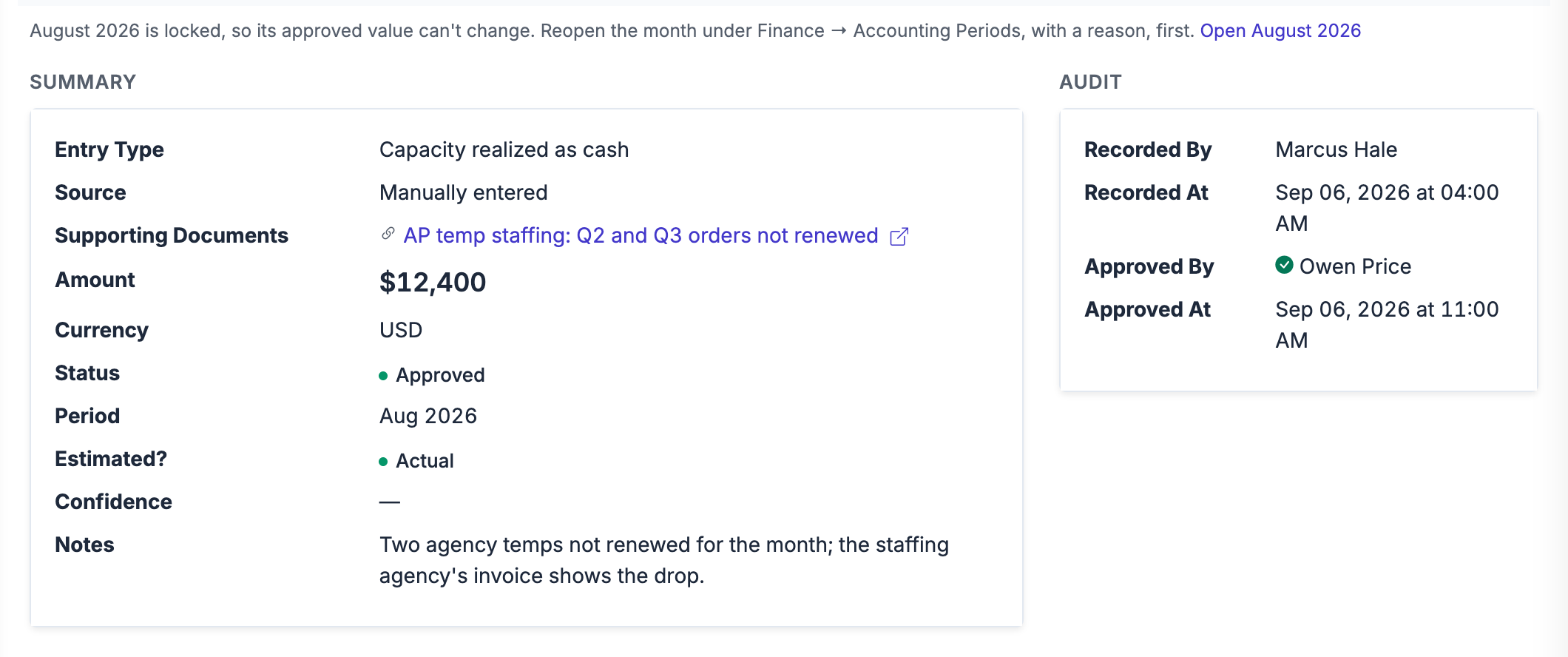
Step 3 as Roiva records it: freed capacity counted as cash for one month, citing the staffing agency's orders, recorded by one person and approved by another. The month is closed, so the entry can't change until someone reopens it with a reason.
Example initiatives
What teams are tracking with Roiva
A few of the initiative templates ready to deploy from the in-app library. Each ships with its formulas and the integrations it reads, and takes its baseline from your own history where your systems hold it.
AI invoice processing
Minutes per bill before and after, from a time study, × the bills in your books × your AP rate, as freed capacity. Fewer bills entered wrong frees the rework time too; the duplicate payments they keep from going out count as cash, through the library's loss-avoidance formula.
Automated close
Reconciliation hours saved per close × closes in the period × your accounting rate, as freed capacity. Days off the close are priced at a daily cost of late reporting you set, and stay capacity, not cash.
AI cash flow forecasting
Treasury hours saved per forecast, as capacity. Better forecast accuracy counts as cash, at your cost of capital on the idle cash it frees, for the share of the change you credit to the AI. Roiva ships no default for that share.
Billing error reduction
Fewer billing disputes: the time spent resolving them as freed capacity, and disputes settled sooner valued at your cost of capital on the cash they held up.
Connects to
Works with the systems you already run
The integrations most relevant to Finance & Accounting initiatives, and what Roiva does with each one.



AI bills and expenses, booked to initiatives by vendor mapping or allocation rule. Closing a month posts a journal tagging each bill an allocation rule booked to its initiatives' class, department, location or tracking category.


Cloud spend on the AI services an initiative runs on, Bedrock, Azure OpenAI and Vertex AI included, put on initiatives by tag, budget or service.

Roiva books the revenue your AI product brings in from the Stripe customers you map to it, net of refunds and tax, at your margin, charge by charge.
Roiva books the AI subscriptions people put on American Express cards, by merchant, from the statements you import, so seats reach their initiatives.

Roiva books the Snowflake spend behind each AI initiative, Cortex AI by service type, and feeds figures from your own tables into its formulas.
Common questions
AI ROI for Finance & Accounting — FAQ
What makes Roiva's AI ROI calculations audit-defensible?
Does Roiva count hours saved as savings?
Does Roiva post journal entries back to my accounting system?
How does Roiva track AI infrastructure costs across providers?
Can Roiva track budget vs. actual for each AI initiative?
What can we hand to the board and the auditors?
Does Roiva support multi-currency or international finance teams?
Measure your first AI initiatives in Roiva, free.
Measure up to 5 initiatives at a time on your own data, list every idea you're weighing, and keep it all when you measure more. No card, no expiry.