

Support
Intercom
Roiva shows what Fin is worth: the Intercom conversations it resolves, priced as agent time freed, with the ones customers came back about left out.
What it answers
What Fin's resolutions are worth in agent time, counted by Intercom's own record of how each conversation ended
What Roiva reads
Conversations from the last 12 months. Intercom sends each with its messages; Roiva keeps only the fields it counts with.
Setup
One OAuth approval in Intercom, by a teammate who can install apps
What you can measure with Intercom
Conversations Fin resolved
Counted by Fin's own record of how a conversation ended, or by a tag, less those the customer reopened or followed up within your recontact window, and priced per conversation as freed capacity.
intercom.conversations.closed_count
Starts from the AI Support Ticket Routing & Resolution template
Time agents save on the rest
For AI-drafted replies: conversations agents resolved × the fall in agent minutes per conversation from a time study × your labor rate. Fin's conversations are left out, so none counts twice.
intercom.conversations.agent_resolved_count
Starts from the AI Support Ticket Routing & Resolution template
Fin's cost beside it
Fin's per-resolution charge is the initiative's cost, from Intercom's invoice or the bill in your books, so cash ROI sets it against the cash the freed time became.
Response time and CSAT
Tracked against their baseline, never priced: a faster reply is the customer waiting less, not agents working less.
intercom.conversations.avg_first_response_hours
intercom.conversations.csat_score
A worked month
Fin answering first-line conversations
Deflection value, booked monthly from Intercom, for September
| Conversations Fin resolved in September, by Intercom's own record | 2,300 | Intercom |
| Reopened, or followed up within 4 days | 240 | Intercom, left out |
| Price per conversation, 8 minutes at $48 an hour | $6.40 | Your time study |
(2,300 − 240) conversations × $6.40
$13,184 freed capacity for September, reported beside cash ROI, never in it
Fin's own charge for those resolutions is the initiative's cost. Cash ROI counts only the freed time that became cash, such as outsourced seats you didn't renew, with the contract cited.
Illustrative figures. Roiva keeps every input with the entry it calculates, and none of it counts until it's approved.
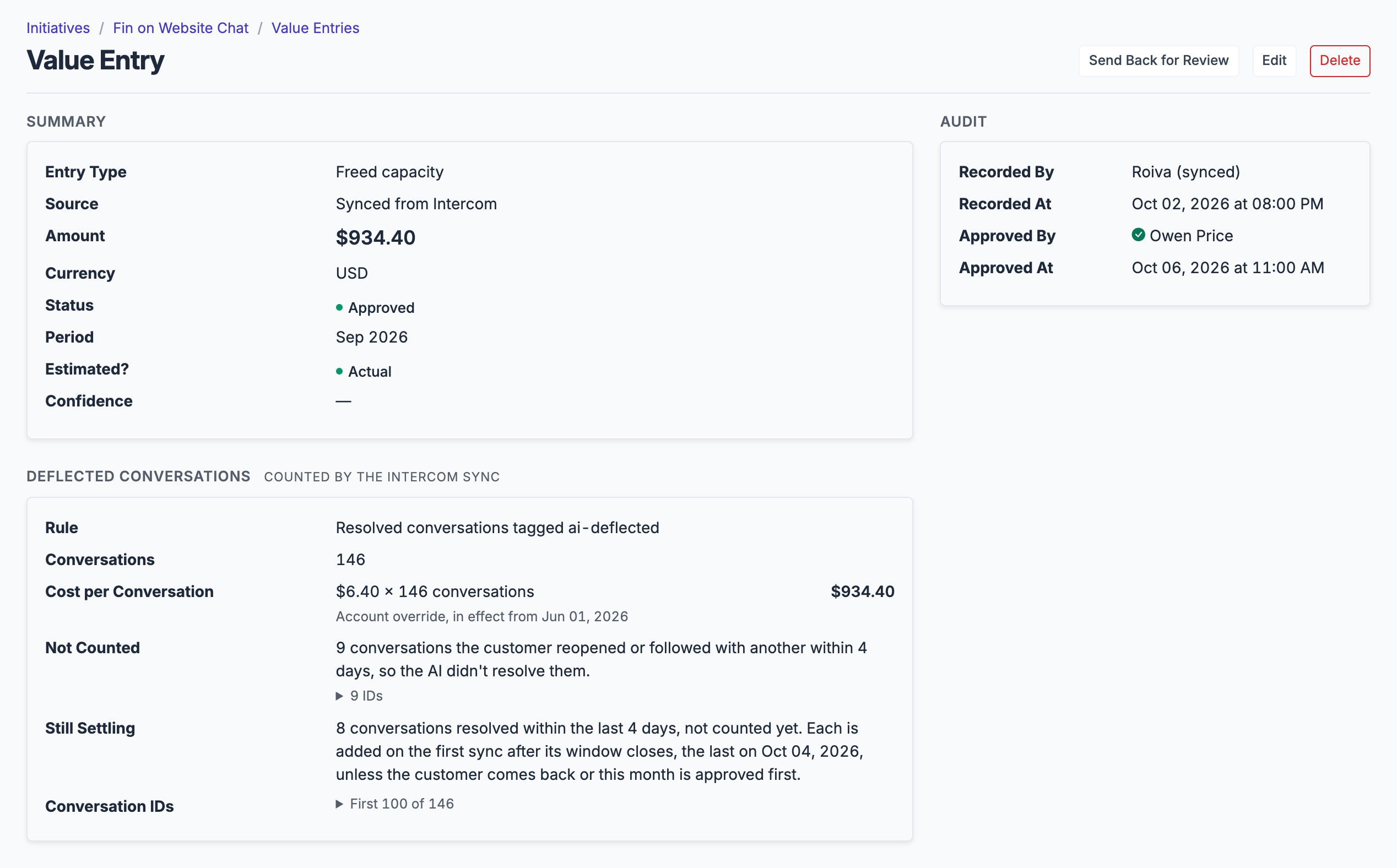
A month of Fin as Roiva books it: the rule, the price, what's left out, and what's still inside the recontact window.
What gets synced
Roiva writes these metric observations on each sync. Reference the key in a value formula to use this data in your ROI calculations.
Conversations
intercom.conversations.volume
Conversation Volume
count
intercom.conversations.closed_count
Closed Conversations
count
intercom.conversations.agent_resolved_count
Conversations Resolved by Human Agents
count
intercom.conversations.avg_first_response_hours
Avg First Response Time (hours)
duration
intercom.conversations.avg_resolution_days
Avg Close Time (hours — canonical row in days)
duration
intercom.conversations.csat_score
Avg CSAT Rating (1–5 — canonical row 0–1)
score
What Roiva keeps
Reads: Conversations created in the last 12 months. Intercom sends each conversation with its messages and the people in it; Roiva keeps only the fields the field-by-field table lists.
Keeps: Records of conversations, plus the totals worked out from them.
What Roiva can access
Roiva asks Intercom for these permissions:
- Read conversations: each conversation's state, channel, timestamps, response and close times, rating, tags, assignee IDs and whether Fin took part. Roiva doesn't store message text or customer contact details
- Read admins: only your workspace's name, ID and region, so Roiva knows which workspace a connection belongs to
How to connect
You connect Intercom from inside Roiva, so you need a Roiva workspace first. Sign in to connect it now. New to Roiva? Start free with your work email, take the free assessment and create your workspace at the end, or request an invite.
- In Roiva: Connect via OAuth — you will be redirected to Intercom to authorize
- In Intercom: Sign in as a teammate with the Can install, configure and delete apps permission, or ask an admin who has it. If your workspace is hosted in the EU or Australia, pick your region on Intercom's sign-in page and sign in with email, not Google, which fails on the wrong region
- Back in Roiva: The connection page checks each step and says what's missing. Once it's all ticked, click Test Connection
- Back in Roiva: After connecting, link this connection to an initiative on the Initiatives tab
Disconnecting or uninstalling
- In Intercom: Go to Settings → Integrations → App Store, find Roiva and click Uninstall. Intercom revokes Roiva's access, and Roiva marks the connection disconnected and stops syncing
- Or in Roiva: Open the connection and choose Disconnect to stop syncing. To revoke Roiva's access as well, uninstall it in Intercom
- Either way, metrics Roiva already synced stay on your initiatives
Need help?
Email hello@roiva.ai with what you're seeing, and you'll hear back within one business day.
Intercom
Start free, then connect Intercom once your workspace is set up. Or begin with the free AI ROI exposure assessment.
Start free → Sign in to connectRelated integrations

