
Attribute what your AI support agents are actually delivering.
Roiva counts the tickets your AI agent actually resolved, prices the agent time it gave back, and sets the cash that reaches your budget against what the AI costs.
The problem
Most teams measure activity (tickets routed, suggestions accepted) — not what the hours freed are worth, or how much of it became cash.
Worked example
One month of an AI support agent, line by line
Illustrative figures, not a customer's: a 60-agent team on Zendesk with an AI agent answering customers and AI-drafted replies for everything else.
-
1
Count what the AI actually resolved
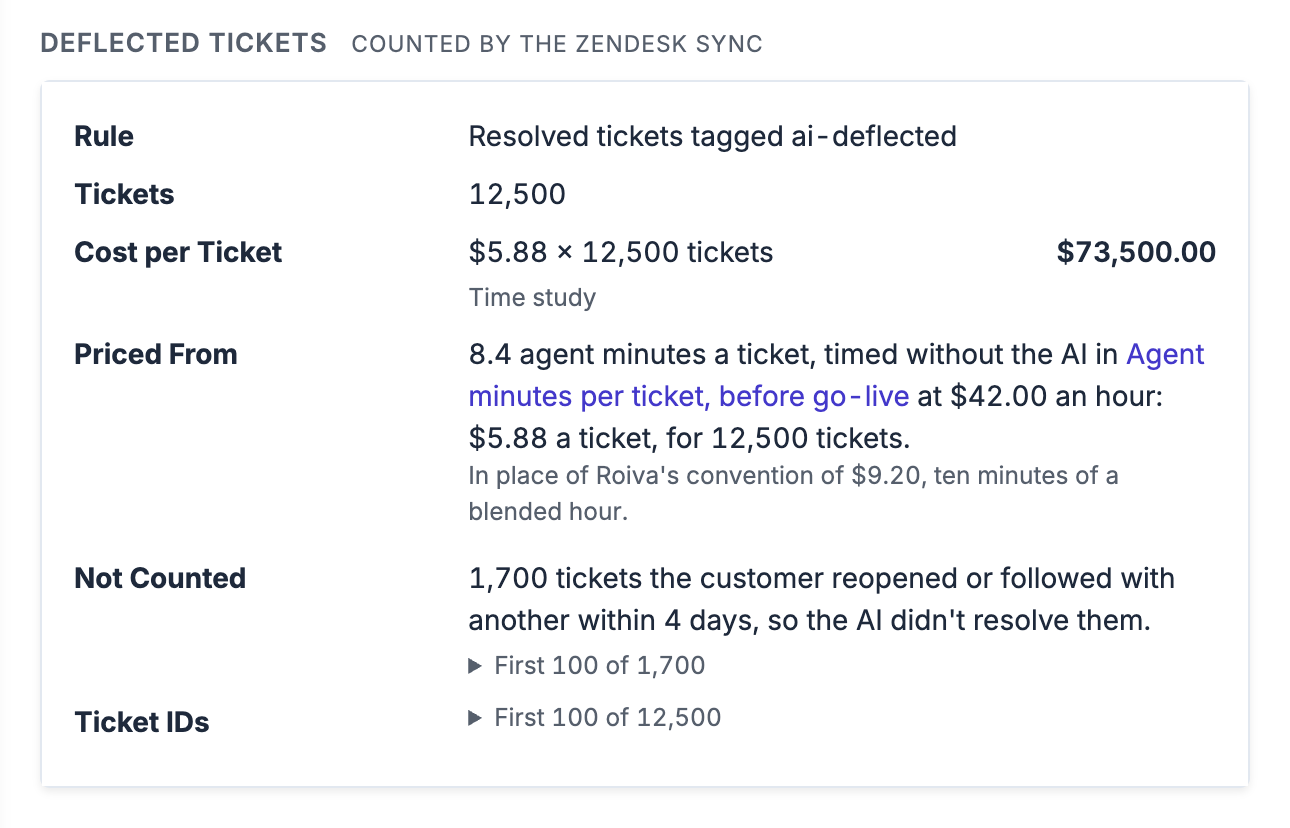
A ticket counts when it's solved, it matches your deflection rule, and the customer doesn't reopen it or write in again within four days. The ones customers come back on are left out by ticket ID, with the ticket they came back in, and count as agent work.
Tickets solved in June 42,000 Matched your rule: solved by the AI agent and tagged ai-deflected 14,200 Customer came back within 4 days −1,700 Deflected, 30% of tickets solved 12,500 -
2
Price the agent time each one gave back
Before go-live, 14 agents timed 412 tickets in a time study. Its minutes × your loaded agent cost price each deflected ticket. The tickets an AI takes are often the simple ones; if yours are, set your own price per ticket, and it replaces the study's.
Agent minutes per ticket, before go-live 8.4 Loaded agent cost per hour $42 Price per deflected ticket $5.88 Freed capacity: 12,500 × $5.88 $73,500 -
3
Price the minutes AI drafts saved on the rest
Every ticket the AI didn't resolve is agent work, including the ones customers came back on. A second study after go-live timed agent minutes per ticket with AI drafts. Faster first responses mean customers waiting less, not agents working less, so they aren't priced.
Tickets agents solved 29,500 Agent minutes per ticket with AI drafts 7.1 Minutes saved per ticket, at $42 an hour 1.3 Freed capacity $26,845 -
4
Count as cash only what a document shows
Your team is paid the same either way, so freed capacity isn't cash. It becomes cash when a budget shows it: recorded for the month with the document cited, and never more than the capacity approved for that month.
Freed capacity, steps 2 and 3 $100,345 6 outsourced seats not renewed, contract cited $22,800 Overtime down from $15,600 to $9,400, payroll report cited $6,200 Cash value $29,000 -
5
Set it against everything the AI costs
The vendor billed 15,000 resolutions and 12,500 held up, so each deflected ticket cost $1.20, not $1.00. Help desk seats aren't counted: you pay for them either way.
AI agent: 15,000 resolutions billed at $1.00, from the vendor's bill in your books $15,000 AI drafting add-on: 60 agent seats $3,000 Model usage for triage, from Anthropic's Admin API $1,850 Support ops time tuning the agent: 75 hours × $42 $3,150 Total cost $23,000
Priced as savings, the same month reads 336%. The difference is capacity no budget has shown yet.
None of it counts until a person approves the month, and each line keeps what it was counted from: the rule and ticket IDs, the time study and rate, or the cited document. How deflection value is booked →
What a reviewer sees in Roiva
Steps 1 and 2 as Roiva records them: one entry a month, synced from the help desk, with the rule it counted under, the price and the time study it came from, the tickets left out because the customer came back, and the ticket IDs to open in Zendesk. It waits in Approvals until a person signs it off.
Example initiatives
What teams are tracking with Roiva
A few of the initiative templates ready to deploy from the in-app library. Each ships with its formulas and the integrations it reads, and takes its baseline from your own history where your systems hold it.
AI ticket deflection
Track tickets resolved by AI vs. routed to humans, priced as freed capacity at your cost per ticket, or at the agent minutes a time study of your own measured × your labor rate. Outsourced seats or overtime cut because of it count as cash, with the contract cited.
AI-drafted replies, triage and routing
Priced as agent capacity freed: the fall in agent minutes per ticket, from a time study your agents run in Roiva or your help desk's time tracking, × the tickets agents resolved × your labor rate, reported beside cash ROI rather than in it. Faster first responses and CSAT aren't priced.
AI quality assurance
The manual QA sampling AI review replaces: tickets × the share your analysts used to score × their minutes per review × their rate, as freed capacity. The QA tool's fee and the weeks calibrating it against human scores are costs.
Churn prevention
The fall in monthly churn × MRR from your billing system, at your contribution margin and only for the share of the change you credit to the AI. Roiva ships no default for either, and it counts as cash.
Connects to
Works with the systems you already run
The integrations most relevant to Customer Support initiatives, and what Roiva does with each one.

Tickets opened and solved, the tickets your AI agent resolved under the rule you set, booked as deflection, the tickets agents resolved, first-response and resolution times, and CSAT.

The same, counted in conversations. You can also count only the conversations where the customer confirmed Fin's answer helped.

Tickets opened and resolved, the tickets your AI agent resolved under your rule, the tickets agents resolved, and first-response and resolution times.

Messaging sessions an Agentforce agent or Einstein Bot handled with no person, booked as deflection, and cases opened and closed.



Your AI agent vendor's bills, per-resolution fees included, booked to the initiative through a vendor mapping. No help desk connection books a cost.


Common questions
AI ROI for Customer Support — FAQ
How do I measure ROI from an AI customer support agent?
Which support platforms does Roiva integrate with?
Can I track ROI for an AI tool I haven't deployed yet?
How does Roiva handle attribution when AI and human agents collaborate?
Measure your first AI initiatives in Roiva, free.
Measure up to 5 initiatives at a time on your own data, list every idea you're weighing, and keep it all when you measure more. No card, no expiry.