
Dev
GitHub
Roiva prices the time GitHub Copilot gives your developers back and books Copilot's seats from GitHub's bill, so an AI coding rollout shows both sides.
What it answers
Whether your AI coding rollout pays back, developer time freed against what Copilot costs
What Roiva reads
Closed pull requests, deployments, daily Copilot totals and billing. Never a pull request's description, reviews or comments.
Setup
Install the Roiva GitHub App on your organization and choose the repositories
What you can measure with GitHub
Developer time from Copilot
Suggestions developers accepted × minutes saved per acceptance × your developer rate, as freed capacity. Roiva starts from one minute per acceptance until you set your own.
github.copilot.suggestions_accepted
Starts from the AI Coding Assistant Rollout template
Copilot's cost, from GitHub's bill
Seats as software cost and AI credits as token cost, each at what GitHub charged after discounts, so an allowance your plan covers books nothing.
github.cost.copilot_spend
Delivery, tracked beside it
Merged pull requests and cycle time against their baseline, a cross-check beside Copilot's figure rather than priced with it. Where an assistant reports nothing Roiva can read, such as Claude Code on a claude.ai plan, the extra pull requests merged are priced instead, at the developer hours one takes and the share of the change you credit to the rollout.
github.pull_requests.merged_count
github.pull_requests.cycle_time_avg
Starts from the AI Coding Assistant Rollout template
Adoption
Acceptance rate and active Copilot users by month, to see whether the rollout took before reading its value.
github.copilot.acceptance_rate
github.copilot.active_users_avg
Copilot code review
Pull requests Copilot reviewed each month and the suggestions it left on them, read beside what Copilot costs. Roiva doesn't price review time. GitHub counts a suggestion as applied only when it's committed with its Commit suggestion button, so fixes made by hand don't count.
github.copilot_review.prs_reviewed
github.copilot_review.suggestions
A worked month
Copilot for 60 engineers
Developer Capacity Freed by AI (accepted suggestions), from the AI Coding Assistant Rollout template, for September
| Suggestions accepted in September | 18,400 | GitHub Copilot |
| Minutes saved per acceptance | 1 | Roiva's starting figure, until you set yours |
| Developer hourly rate, fully loaded | $94.50 | Roiva's default, until you set yours |
18,400 acceptances × 1 minute × $94.50 ÷ 60
$28,980 freed capacity for September, reported beside cash ROI, never in it
Against it, GitHub's bill: 60 Copilot seats come to $1,140 for the month, booked as software cost. Cash ROI counts the seats, and the freed time sits beside it until it becomes cash.
Illustrative figures. Roiva keeps every input with the entry it calculates, and none of it counts until it's approved.
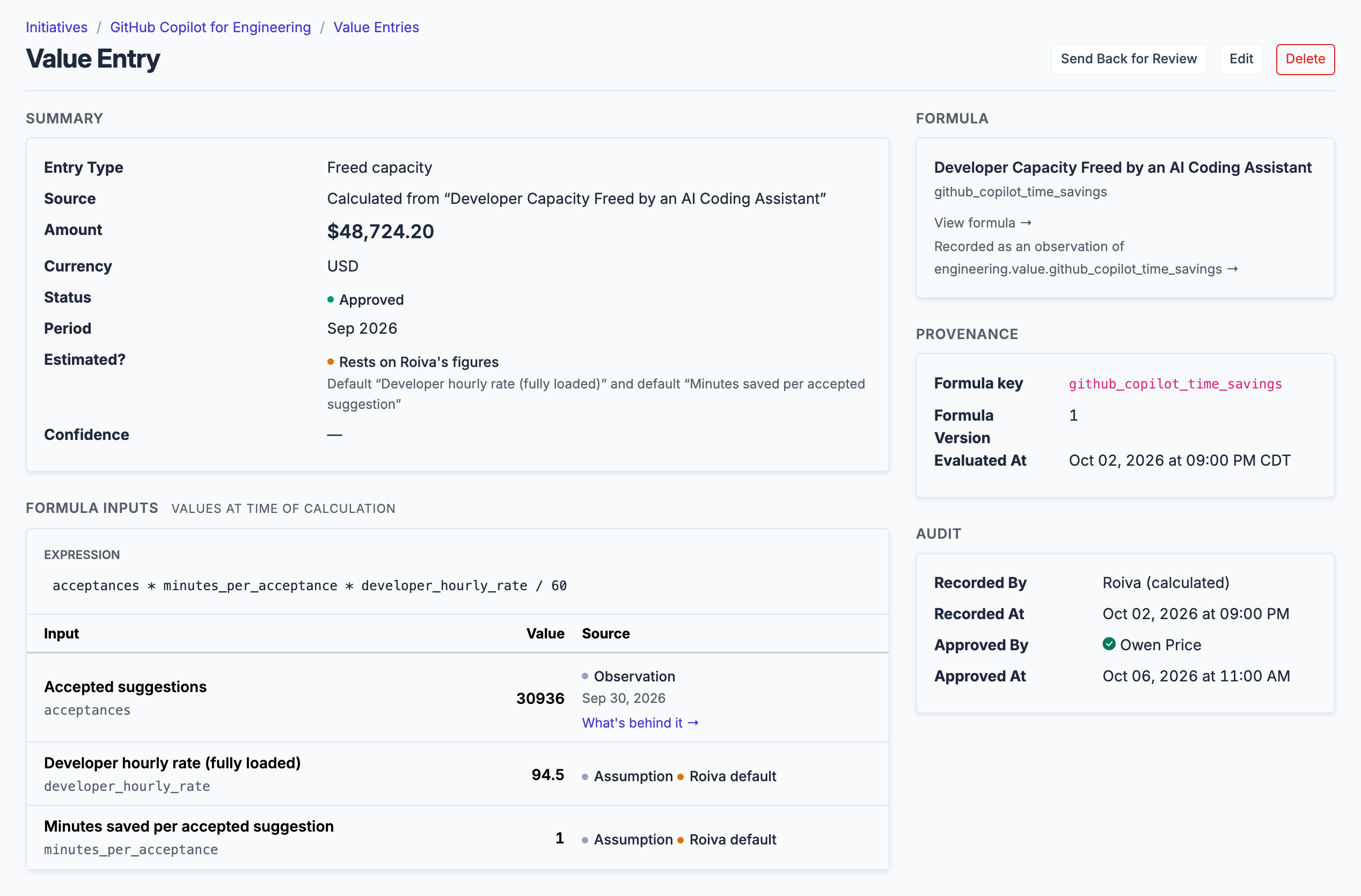
Copilot's accepted suggestions through the formula, with the entry saying plainly that it rests on Roiva's starting figures until you set your own.
What gets synced
Roiva writes these metric observations on each sync. Reference the key in a value formula to use this data in your ROI calculations.
Pull Requests
github.pull_requests.merged_count
Merged PR Count
count
github.pull_requests.cycle_time_avg
Avg Cycle Time (hours)
duration
github.pull_requests.additions_avg
Avg Lines Added per PR
count
Deployments
github.deployments.count
Production Deployments
count
Copilot Usage
github.copilot.suggestions_shown
Suggestions Shown
count
github.copilot.suggestions_accepted
Suggestions Accepted
count
github.copilot.acceptance_rate
Acceptance Rate (%)
percentage
github.copilot.lines_accepted
Lines of Code Accepted
count
github.copilot.active_users_avg
Avg Daily Active Users
count
github.copilot_review.prs_reviewed
Pull Requests Reviewed by Copilot
count
github.copilot_review.suggestions
Code Review Suggestions
count
github.copilot_review.applied_suggestions
Code Review Suggestions Applied
count
github.copilot_review.active_users_avg
Avg Daily Code Review Users
count
Billing & Spend
github.cost.total_spend
Total GitHub Spend
currency
github.cost.copilot_spend
Copilot & AI Credit Spend
currency
github.cost.product_spend
Per-product spend (one row per product, the product in the row's dimensions)
currency
What Roiva keeps
Reads: From the repositories the connection can see, pull requests closed and deployments made in the last 6 months, with each merged pull request's line counts; and each organization's daily Copilot totals and billing for the last 3 months. Never a pull request's description, reviews or comments.
Keeps: Records of pull requests, deployments, daily Copilot totals and billing lines, plus the totals worked out from them.
Common questions
Are GitHub Copilot seats counted as cost, and how?
How to connect
You connect GitHub from inside Roiva, so you need a Roiva workspace first. Sign in to connect it now. New to Roiva? Start free with your work email, take the free assessment and create your workspace at the end, or request an invite.
- In Roiva: Click Continue to Authorize — you will be redirected to GitHub to install the Roiva GitHub App
- In GitHub: Select the organization and choose which repositories to grant access to (if the app is already installed there, choose Configure, then Save) — note that Copilot and cost metrics are organization-scoped, so a personal account produces pull request data only
- In GitHub: Approve the authorization prompt — Roiva uses it to confirm your GitHub account can access the installation you just chose. GitHub only asks the first time
- In GitHub: For Copilot metrics, an organization owner enables the 'Copilot usage metrics' policy under the organization's Settings → Copilot → Policies. GitHub refuses the data until it's on, even to owners. The 'Copilot metrics API' policy next to it isn't needed
- Back in Roiva: Your connection is created automatically — PR data, Copilot usage and GitHub spend will sync nightly
- Back in Roiva: The connection page checks each step and says what's missing
- Back in Roiva: Link this connection to an initiative on the Initiatives tab
Need help?
Email hello@roiva.ai with what you're seeing, and you'll hear back within one business day.
GitHub
Start free, then connect GitHub once your workspace is set up. Or begin with the free AI ROI exposure assessment.
Start free → Sign in to connectRelated integrations