Productivity
Microsoft 365
Roiva prices the meeting time an AI assistant such as Copilot gives back, from Microsoft 365 calendars, before and after, at your hourly rate, keeping no names.
What it answers
How much meeting time Copilot or another meeting assistant gives back across Microsoft 365
What Roiva reads
Events on the calendars you choose: when, how long and how many were invited. Microsoft sends each event's subject, organizer and attendees; Roiva keeps none of them.
Setup
One OAuth approval in Microsoft, and an Entra admin's consent for the organization if Microsoft asks for it
What you can measure with Microsoft 365
Meeting time, priced
Attendee-hours in meetings before the assistant, less attendee-hours now, at your blended hourly rate, as freed capacity.
microsoft_365.calendar.meeting_hours
microsoft_365.calendar.avg_attendees
Starts from the AI Meeting Assistant template
Fewer, shorter, smaller
Meeting count and average length by month against their baseline, to see which of the three the assistant changed.
microsoft_365.calendar.meeting_count
microsoft_365.calendar.avg_meeting_duration_mins
A baseline from your own calendars
The baselines come from your calendars' own months before the assistant, not an industry average.
Updates in Teams too
Add a Teams workflow webhook and Roiva posts the same initiative updates it would to Slack: stage changes, approvals and notes.
A worked month
Copilot in meetings for a 90-person finance and operations group
Meeting Freed Capacity, from the AI Meeting Assistant template, for September
| Meeting hours a month before Copilot | 2,050 | Calendar history |
| People invited to the average meeting before | 5.2 | Calendar history |
| Meeting hours in September | 1,960 | Microsoft 365 |
| People invited to the average meeting in September | 4.8 | Microsoft 365 |
| Blended hourly rate | $58 | Set by Finance |
(2,050 × 5.2 − 1,960 × 4.8) × $58
$72,616 freed capacity for September, reported beside cash ROI, never in it
Copilot's own license is the initiative's cost, from Microsoft's invoice or the bill in your books, so cash ROI sets it against the freed time once it becomes cash.
Illustrative figures. Roiva keeps every input with the entry it calculates, and none of it counts until it's approved.
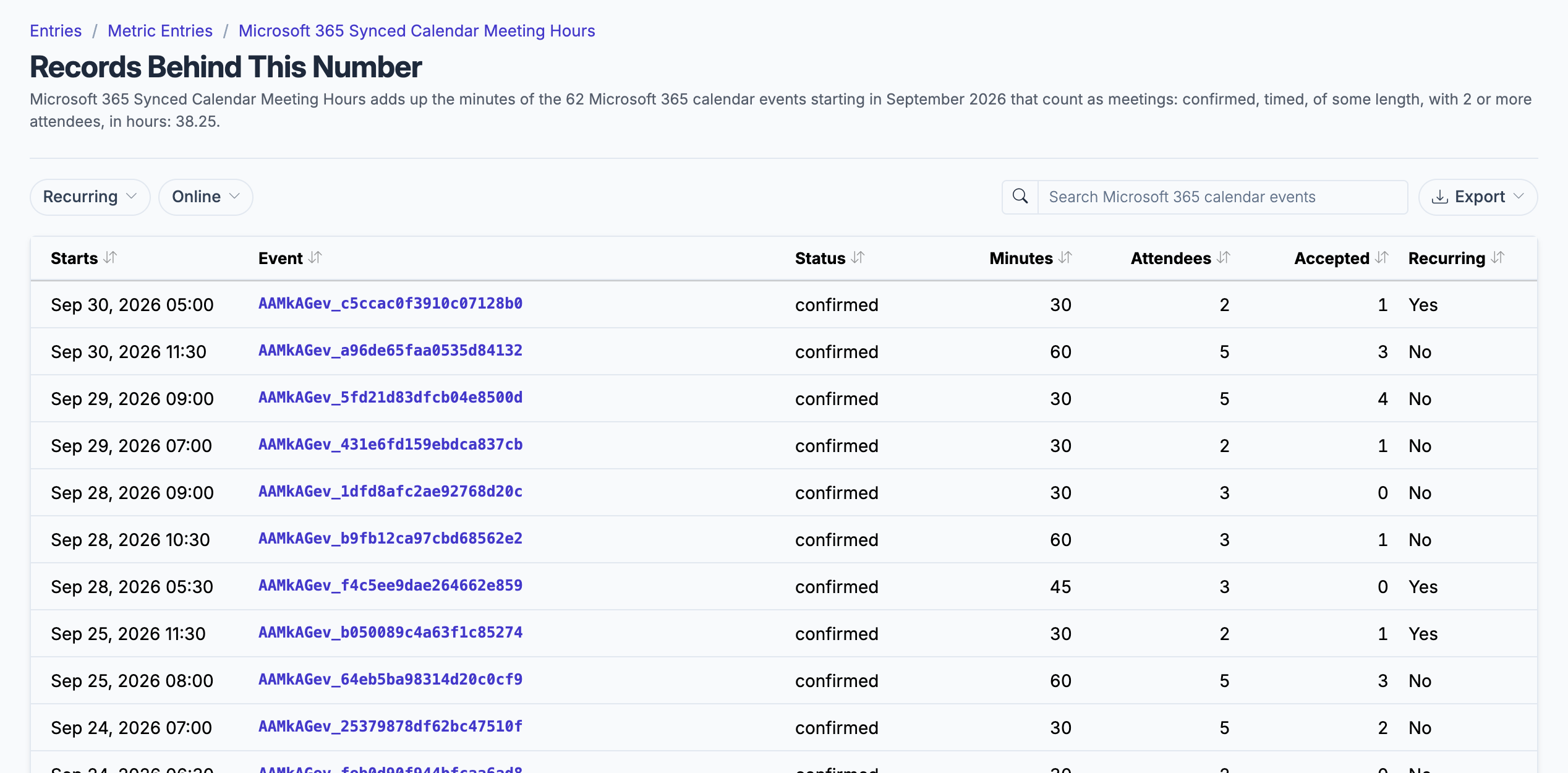
The meetings behind a month's hours, by day and length, with no subject or attendee kept.
What gets synced
Roiva writes these metric observations on each sync. Reference the key in a value formula to use this data in your ROI calculations.
Calendar Events
microsoft_365.calendar.meeting_count
Meetings on the Connected Calendar
count
microsoft_365.calendar.meeting_hours
Meeting Hours on the Connected Calendar
duration
microsoft_365.calendar.avg_meeting_duration_mins
Avg Meeting Duration on the Connected Calendar (minutes)
duration
microsoft_365.calendar.avg_attendees
Avg Attendees per Meeting on the Connected Calendar
count
What Roiva keeps
Reads: Events on the calendars you choose, from 12 months back to the end of this month. Microsoft sends each event's subject, organizer and attendees; Roiva keeps none of them. Teams notifications, if you add a webhook, post the same updates as Slack.
Keeps: Records of calendar events, plus the totals worked out from them.
How to connect
Roiva is listed on Microsoft Marketplace — you can start free there with your Microsoft work account.
You connect Microsoft 365 from inside Roiva, so you need a Roiva workspace first. Sign in to connect it now. New to Roiva? Start free with your work email, take the free assessment and create your workspace at the end, or request an invite.
- In Roiva: Connect via OAuth — you will be redirected to Microsoft to authorize
- In Microsoft: Approve read-only access to your Outlook Calendar. Roiva also sees your name and email address, never your mail. Microsoft's default settings leave calendar access for an admin to approve: if Microsoft says you need admin approval, a Microsoft Entra admin connects Roiva once and ticks the option to consent on behalf of your organization, and after that anyone in it can connect
- In Teams (optional, to post to a channel): In the channel you want Roiva to post to, choose ⋯ → Workflows, pick the Send webhook alerts to a channel template, confirm the team and channel, save, and copy the webhook URL it gives you. If it asks who can trigger the workflow, choose Anyone — Roiva's posts carry no Microsoft sign-in
- Back in Roiva (optional): Paste that URL into the Webhook URL field and tick what the channel should post
- Back in Roiva: The connection page checks each step and says what's missing. Once it's all ticked, click Test Connection
- Back in Roiva: After connecting, link this connection to an initiative on the Initiatives tab
Need help?
Email hello@roiva.ai with what you're seeing, and you'll hear back within one business day.
Microsoft 365
Start free, then connect Microsoft 365 once your workspace is set up. Or begin with the free AI ROI exposure assessment.
Start free → Sign in to connectRelated integrations