

Data
BigQuery
Roiva runs versioned SQL against your BigQuery tables so figures already in your warehouse price an AI initiative, and tracks the query load it adds.
What it answers
What an AI initiative is worth by figures already in your warehouse, and what it adds to BigQuery's load
What Roiva reads
Job counts, bytes processed and slot time for the project, and from your own tables only the results of the metric queries you write.
Setup
A service account with the BigQuery roles the setup steps list, and the region your jobs run in
What you can measure with BigQuery
Figures from your own tables
A versioned SQL query turns figures already in your warehouse, claims triaged or loans underwritten, into monthly readings a formula can price, instead of numbers typed in.
Versioned, so it can be checked
Each change to a metric query is kept, so a figure from last quarter can be traced to the SQL that produced it.
Query load beside it
Jobs, bytes processed and slot time by month against their baseline, for an initiative that adds warehouse work.
bigquery.jobs.count
bigquery.jobs.bytes_processed
bigquery.jobs.slot_ms
Its cost, from Google Cloud
BigQuery's spend is on your Google Cloud bill, so it reaches the initiative through the Google Cloud connection's budget, not this one.
A worked month
A claims-triage model, counted by your own query
Your own formula, reading a versioned metric query, for September
| Claims the model triaged in September, from your query | 2,300 | BigQuery |
| Adjuster minutes saved per claim | 6 | Your time study |
| Adjuster hourly rate | $40 | Set by Finance |
2,300 claims × 6 minutes × $40 ÷ 60
$9,200 freed capacity for September, reported beside cash ROI, never in it
The query returns one row a month, with its period, value and sample size, and nothing else from your tables leaves BigQuery.
Illustrative figures. Roiva keeps every input with the entry it calculates, and none of it counts until it's approved.
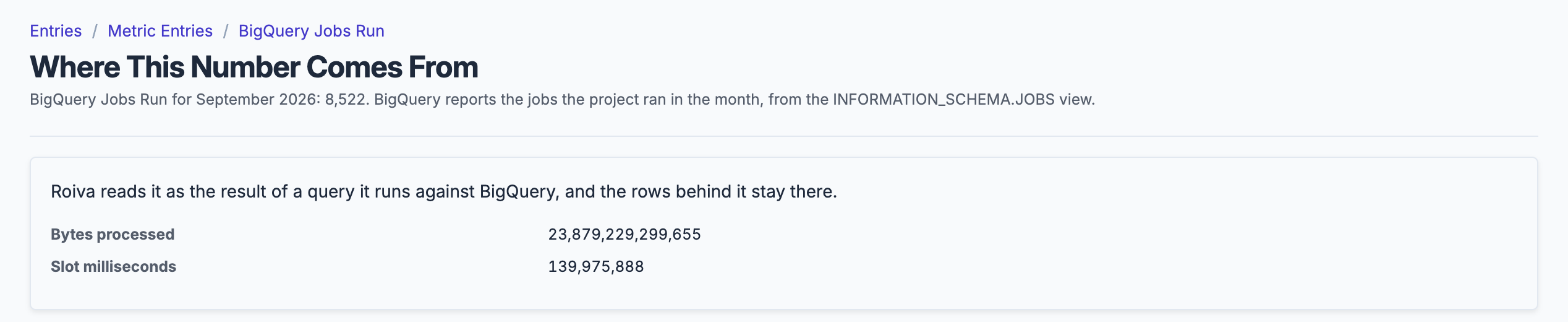
A month's job count, bytes processed and slot time, read from BigQuery's own job history; the rows stay in BigQuery.
What gets synced
Roiva writes these metric observations on each sync. Reference the key in a value formula to use this data in your ROI calculations.
Job Statistics
bigquery.jobs.count
Job Count
count
bigquery.jobs.bytes_processed
Bytes Processed
count
bigquery.jobs.slot_ms
Slot Milliseconds
count
What Roiva keeps
Reads: Job counts, bytes processed and slot time from INFORMATION_SCHEMA.JOBS, added up by month inside BigQuery, for about the last six months. Never a query's text or who ran it. Your own tables only through the metric queries you write, and from those only the period, value, entity and sample_size columns, one row per month.
Keeps: Totals only, such as a month's count or spend. No record is kept. For each metric query you write, every version of its text and the rows each version returned: a month, a number, a record count, and a breakdown's value, which is whatever the query selects as its entity. These stay after the connection is deleted, because the figures computed from them point to them.
How to connect
You connect BigQuery from inside Roiva, so you need a Roiva workspace first. Sign in to connect it now. New to Roiva? Start free with your work email, take the free assessment and create your workspace at the end, or request an invite.
- In Roiva: Enter the Project ID of the project whose BigQuery jobs Roiva should read, and set the Region field if its jobs don't run in the US multi-region (us, eu, or a single region such as us-central1). INFORMATION_SCHEMA is read per region, so a mismatch returns no jobs rather than an error; the connection check says where your jobs actually run. Click Create Connection: Roiva creates a Google service account for this connection and shows its email on the connection page
- In Google Cloud: Grant that service account two read-only roles on the project: BigQuery Job User, so it can run its query there, and BigQuery Resource Viewer, so it can read every user's jobs from INFORMATION_SCHEMA.JOBS. The connection page lists both gcloud commands, filled in, to paste into Cloud Shell or send to whoever administers your Google Cloud
- Back in Roiva: The connection page checks each grant, and that Region matches where your jobs run, as the service account, and says what's still missing. Once they're all ticked, click Test Connection
- Back in Roiva: Link this connection to an initiative on the Initiatives tab
- In Google Cloud: To feed metrics from your own tables, create a dataset of views (roiva_metrics, say) and authorize it on the datasets its views read, so the views can read them and the service account can't. Grant the service account BigQuery Data Viewer on that dataset only; the connection page gives the command. Then in Roiva, set Metrics Dataset to it in this connection's settings, and add a query for each metric on its Metric Queries tab
Need help?
Email hello@roiva.ai with what you're seeing, and you'll hear back within one business day.
BigQuery
Start free, then connect BigQuery once your workspace is set up. Or begin with the free AI ROI exposure assessment.
Start free → Sign in to connectRelated integrations
