
Data
Databricks
Roiva books Databricks spend to each AI initiative by tag or by product, model serving included, and can bring its list prices to what your invoice says.
What it answers
What the model serving and other Databricks work behind an AI initiative costs
What Roiva reads
Monthly cost by product, at list price, from Databricks' system.billing tables. Never who ran a job or what it was called.
Setup
A service principal with a SQL-scoped OAuth secret, and a short script a metastore admin runs
What you can measure with Databricks
Spend by tag
Put a custom tag on an initiative's serving endpoints, jobs or clusters, and what carries it is booked to that initiative.
databricks.cost.product_spend
Spend by product
Where resources aren't tagged, map a product such as MODEL_SERVING or JOBS to an initiative instead.
databricks.cost.product_spend
List price, said plainly
Databricks' billing tables price usage at list, so with a negotiated discount Roiva reads above your invoice. A books factor measured against your bills, once an admin accepts it, brings each month to what you paid.
Figures from your own tables
A versioned SQL query turns figures in Unity Catalog into monthly readings a formula can price, instead of numbers typed in by hand.
A worked month
A claims-triage model on Databricks model serving
Cloud cost at list price, booked by tag, then brought to the books, for September
| MODEL_SERVING tagged roiva-initiative=claims-triage | $6,400 | Databricks |
| JOBS with the same tag | $1,100 | Databricks |
| Books factor, your bills against list price | 0.82 | Accepted by an admin |
($6,400 + $1,100) × 0.82
$6,150 booked to the claims initiative for September, at what your invoice says rather than list
The factor is Databricks' bills in your books divided by its list-price usage over the last twelve months. Roiva only measures it: nothing changes until an Owner or Admin accepts it, and a locked month is never touched.
Illustrative figures. Roiva keeps every input with the entry it calculates, and none of it counts until it's approved.
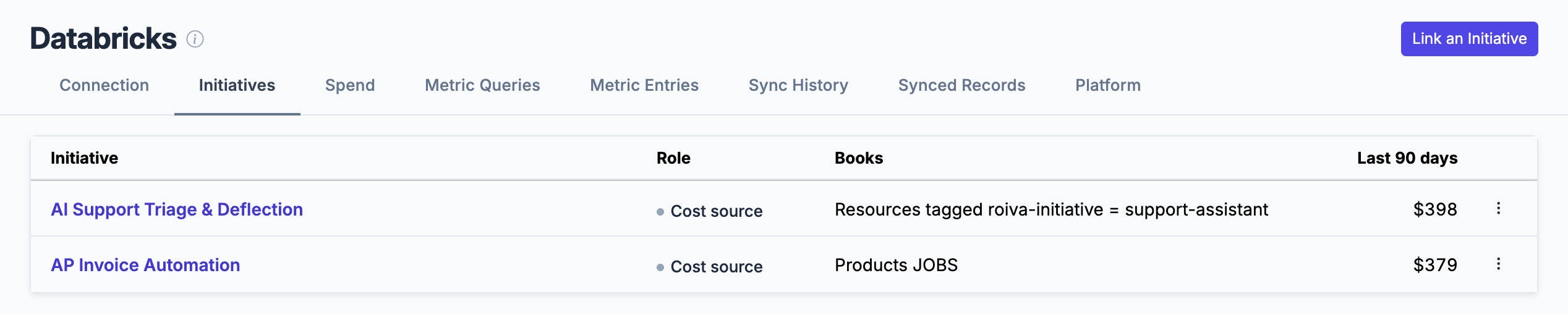
One Databricks connection booking two ways: tagged resources to one initiative, an untagged product to another.
What gets synced
Roiva writes these metric observations on each sync. Reference the key in a value formula to use this data in your ROI calculations.
Billing
databricks.cost.total_spend
Total Spend
currency
databricks.cost.product_spend
Product Spend
currency
What Roiva keeps
Reads: Monthly cost by product, at list price, from Databricks' system.billing tables, for the last 12 months. Never who ran a job or what it was called. Your own tables only through the metric queries you write, and from those only the period, value, entity and sample_size columns, one row per month.
Keeps: Records of monthly cost by product, plus the totals worked out from them. For each metric query you write, every version of its text and the rows each version returned: a month, a number, a record count, and a breakdown's value, which is whatever the query selects as its entity. These stay after the connection is deleted, because the figures computed from them point to them.
How to connect
You connect Databricks from inside Roiva, so you need a Roiva workspace first. Sign in to connect it now. New to Roiva? Start free with your work email, take the free assessment and create your workspace at the end, or request an invite.
- In Databricks: As a workspace admin, open Settings, then Identity and access, then Service principals, and add one for Roiva. On its Secrets tab, generate an OAuth secret with the longest lifetime Databricks allows (730 days). Under Scope, choose Other APIs and add the sql scope only: Roiva asks for a token for SQL and nothing else, and Databricks won't issue one to a secret without it. Copy the client ID and the secret, which Databricks shows only once. Note when it expires: the connection stops syncing then, until a new secret is pasted in
- In Databricks: Give the service principal Databricks SQL access on its Configurations tab, and Can use on the SQL warehouse Roiva should run on, under that warehouse's Permissions (skip this if All workspace users already has Can use there). A small serverless warehouse is enough
- In Databricks: As a metastore admin, run the setup script below in the SQL editor, with the service principal's client ID in place of <client-id>. It lets the service principal read the billing tables and nothing else. Unity Catalog must be on for the workspace. If Databricks answers that you don't have MANAGE on Catalog 'system', you aren't a metastore admin: an account admin makes you one in the account console, under Catalog, then the metastore, then Configuration
- Back in Roiva: Enter the Workspace URL, the address you use for Databricks, and the SQL Warehouse ID from the warehouse's Connection details. Paste the service principal's credentials into API Key / Secret as client_id:client_secret, and save the connection
- Back in Roiva: The connection page checks each step as the service principal and gives the SQL for anything still missing. Once it's all ticked, click Test Connection
- Back in Roiva: To count one initiative's spend, give its serving endpoints, jobs, clusters or warehouses a custom tag (roiva-initiative=invoice-ai, say), and enter it under Tag key and Tag value where it's linked to the initiative. The connection page checks each tag too
- In Databricks: To feed metrics from your own tables, create a view for each in the schema the script makes (workspace.roiva_metrics, or the catalog you chose), which the service principal may read and nothing else. Then in Roiva, set Metrics Schema to that catalog.schema in this connection's settings, and add a query for each metric on its Metric Queries tab
-- Run in the Databricks SQL editor as a metastore admin, with the service
-- principal's client ID (its application ID) in place of <client-id>.
GRANT USE CATALOG ON CATALOG system TO `<client-id>`;
GRANT USE SCHEMA ON SCHEMA system.billing TO `<client-id>`;
GRANT SELECT ON SCHEMA system.billing TO `<client-id>`;

-- For metric queries: a schema of views the service principal may read
-- and nothing else. On a SQL warehouse a view reads its tables with its
-- owner's rights, so the service principal needs no grant on them.
-- A new workspace's catalog is named workspace; an older one's is
-- often main. Use yours in place of workspace.
CREATE SCHEMA IF NOT EXISTS workspace.roiva_metrics;
GRANT USE CATALOG ON CATALOG workspace TO `<client-id>`;
GRANT USE SCHEMA ON SCHEMA workspace.roiva_metrics TO `<client-id>`;
GRANT SELECT ON SCHEMA workspace.roiva_metrics TO `<client-id>`;
Need help?
Email hello@roiva.ai with what you're seeing, and you'll hear back within one business day.
Databricks
Start free, then connect Databricks once your workspace is set up. Or begin with the free AI ROI exposure assessment.
Start free → Sign in to connectRelated integrations

