CRM
HubSpot
Roiva shows whether your AI sales and marketing tools are paying back, pricing the change in HubSpot win rate, sales cycle and lead conversion in dollars.
What it answers
Whether the AI your sales and marketing teams adopted is paying back, in dollars your CFO can check
What Roiva reads
Deals, contacts and tickets, plus campaign, email, blog and web-traffic counts if you allow them. Roiva only reads: never a contact's name, email or phone.
Setup
One OAuth approval in HubSpot, by a super admin or a user allowed to install apps
What you can measure with HubSpot
Win rate
For AI call coaching or deal intelligence: deals decided each month × the rise in win rate since go-live × the average won deal, for the share of the change you credit to the tool, at your contribution margin.
hubspot.deals.win_rate
hubspot.deals.won_count
hubspot.deals.lost_count
hubspot.deals.won_value
Starts from the Sales Coaching & Call Intelligence template
Sales cycle
A deal that closes sooner is the same revenue arriving earlier, so the days saved are valued at your cost of capital on the margin, never as new revenue.
hubspot.deals.avg_sales_cycle_days
Starts from the Sales Coaching & Call Intelligence template
Won deals, one by one
Tie closed-won deals to an AI initiative by a deal-name pattern or a HubSpot property your team sets, and book each one at your margin as it's earned.
hubspot.deals.won_value
Starts from the AI Lead Qualification & Scoring template
Lead conversion
For AI nurture or lead scoring: the rise in MQL-to-SQL conversion since go-live, carried through your close rate and average deal, for the share you credit, at your margin.
hubspot.contacts.mql_count
hubspot.contacts.mql_to_sql_rate
Starts from the Lead Nurturing & Lifecycle Automation template
Marketing output
Blog posts and campaigns your AI helped produce, priced as the hours it freed (reported beside cash ROI, never in it) or as agency spend you didn't need.
hubspot.marketing.posts_published
hubspot.marketing.campaigns_launched
Starts from the AI Content Generation & Personalization template
A worked month
A call-coaching tool for 12 account executives
Win Rate Revenue Uplift, from the Sales Coaching & Call Intelligence template, for September
| Deals decided in September, won or lost | 75 | HubSpot |
| Win rate in the three months before the initiative began | 20% | HubSpot history |
| Win rate in September | 24% | HubSpot |
| Average won deal | $30,000 | HubSpot |
| Share of the change credited to the tool | 50% | Set by your team, with a reason |
| Contribution margin | 70% | Set by Finance |
75 deals × 4 points × $30,000 × 50% × 70%
$31,500 cash value for September, set against the tool's $3,600 for the month
The sales cycle also fell from 62 to 54 days. Valued as revenue arriving sooner, at an 8% cost of capital, that adds about $330 (18 deals won × 8 days × $30,000 × 8% ÷ 365 × 50% × 70%), not another month of revenue.
Illustrative figures. Roiva keeps every input with the entry it calculates, and none of it counts until it's approved.
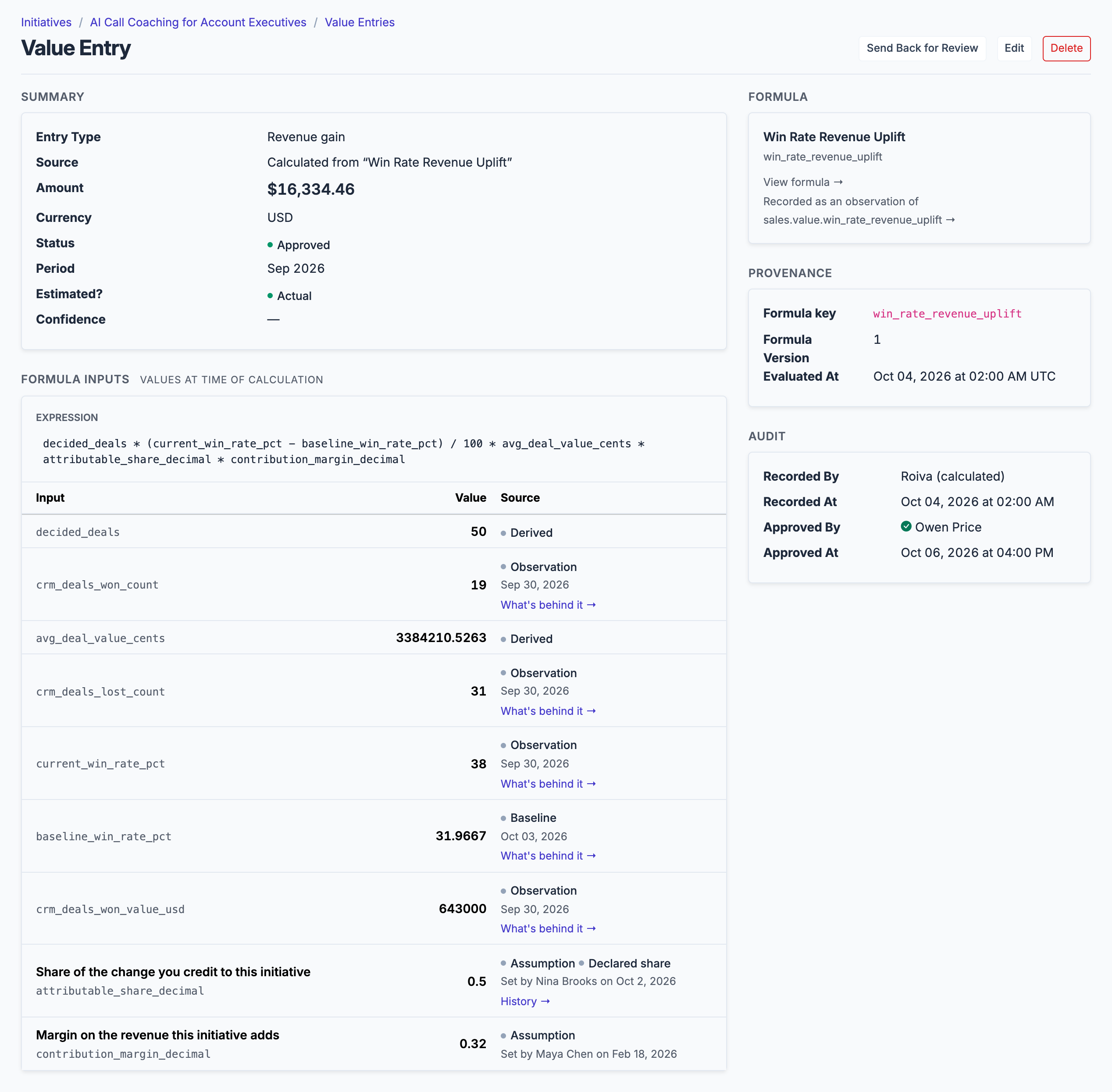
The same formula on a real value entry, with its own figures rather than the illustrative ones above. Every input is kept and the approver named.
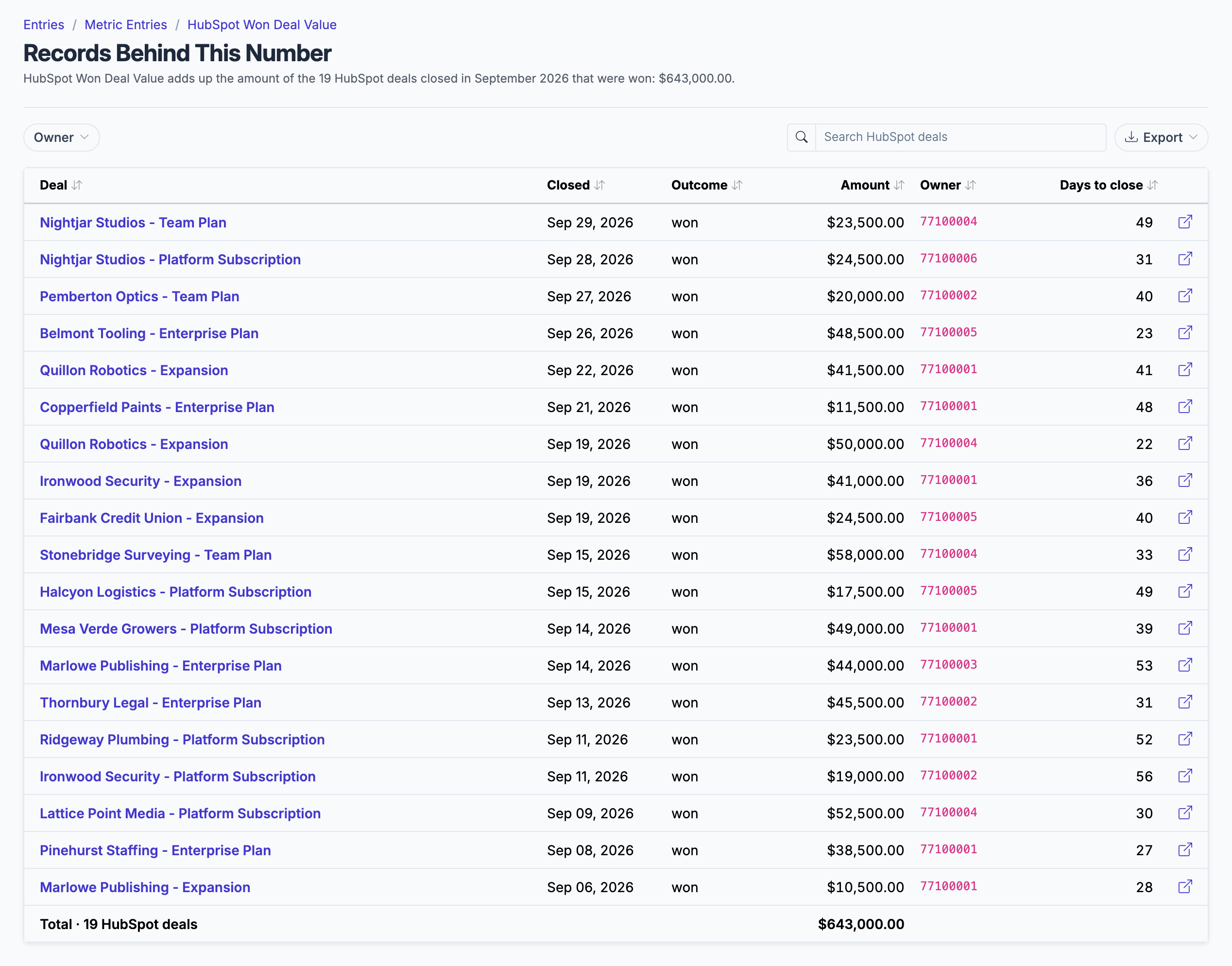
Each HubSpot figure opens the deals it was counted from.
What gets synced
Roiva writes these metric observations on each sync. Reference the key in a value formula to use this data in your ROI calculations.
Deals
hubspot.deals.won_count
Won Deal Count
count
hubspot.deals.lost_count
Lost Deal Count
count
hubspot.deals.won_value
Won Deal Value
currency
hubspot.deals.win_rate
Win Rate
percentage
hubspot.deals.avg_sales_cycle_days
Avg Sales Cycle (days)
duration
hubspot.deals.avg_value
Average Deal Value
currency
hubspot.deals.open_count
Open Deal Count (snapshot)
count
hubspot.deals.open_value
Open Deal Value (snapshot)
currency
Contacts
hubspot.contacts.new_count
New Contact Count
count
hubspot.contacts.mql_count
MQL Count
count
hubspot.contacts.sql_count
SQL Count
count
hubspot.contacts.lead_to_mql_rate
Lead-to-MQL Rate
percentage
hubspot.contacts.mql_to_sql_rate
MQL-to-SQL Rate
percentage
Tickets
hubspot.tickets.new_count
New Ticket Count
count
hubspot.tickets.closed_count
Closed Ticket Count
count
hubspot.tickets.resolution_rate
Resolution Rate
percentage
hubspot.tickets.avg_resolution_days
Avg Resolution Time (days)
duration
Marketing
hubspot.marketing.campaigns_launched
Campaigns Launched
count
hubspot.marketing.email_open_rate
Marketing Email Open Rate (%)
percentage
hubspot.marketing.posts_published
Blog Posts Published
count
hubspot.marketing.organic_sessions
Organic Search Sessions
count
hubspot.tickets.open_count
Open Ticket Count (snapshot)
count
What Roiva keeps
Reads: Deals, contacts and tickets, all of them, with only the properties the field-by-field table lists, so never a contact's name, email or phone or a ticket's subject or content. With the optional marketing permissions, campaigns, marketing emails and blog posts from the last 12 months, and monthly website sessions by traffic source.
Keeps: Records of deals, contacts, tickets, campaigns, marketing emails and blog posts, plus the totals worked out from them.
How to connect
You connect HubSpot from inside Roiva, so you need a Roiva workspace first. Sign in to connect it now. New to Roiva? Start free with your work email, take the free assessment and create your workspace at the end, or request an invite.
- In HubSpot: Connect as a super admin or a user with the App Marketplace access permission — HubSpot lets no one else install an app. If HubSpot shows the three optional marketing permissions (campaigns, content, analytics) as disabled for this app by an admin, a super admin allows them for Roiva under Settings → Integrations → Connected apps first. Campaigns need Marketing Hub Professional or higher, and content (marketing email and blog) needs Marketing Hub or CMS Hub Professional or higher — on a lower tier HubSpot will not offer them, and those counts stay recorded by hand.
- In Roiva: Connect via OAuth — you will be redirected to HubSpot to authorize. Tick the optional marketing permissions if you want campaign, email, blog and organic-traffic metrics.
- In HubSpot: Ensure your HubSpot user has access to the CRM objects you want to sync
- Back in Roiva: The connection page reads each thing Roiva syncs, and names any permission HubSpot hasn't granted: a missing CRM one needs a Reconnect, a missing marketing one needs a Reconnect, and a super admin to allow it first if HubSpot shows it disabled by an admin
- Back in Roiva: After connecting, link this connection to an initiative on the Initiatives tab
Need help?
Email hello@roiva.ai with what you're seeing, and you'll hear back within one business day.
HubSpot
Start free, then connect HubSpot once your workspace is set up. Or begin with the free AI ROI exposure assessment.
Start free → Sign in to connectRelated integrations