CRM
Salesforce
Roiva shows whether Agentforce and your AI sales tools are paying back, booking Salesforce deals and AI-handled conversations at your margin.
What it answers
Whether Agentforce and the AI your sales team adopted are paying back, deal by deal and conversation by conversation
What Roiva reads
Opportunities, cases and Messaging sessions, with only the fields Roiva counts with. Never a case's description, a conversation's messages or a contact.
Setup
One OAuth approval in Salesforce, as a user with API access who can see the records. An admin may first need to install Roiva's app.
What you can measure with Salesforce
Won deals, by a field you set
Mark AI-assisted opportunities with a custom field, and each one is booked as it closes, at your contribution margin, as a one-time, annual or monthly recurring deal.
salesforce.opportunities.won_value
Starts from the AI Lead Qualification & Scoring template
Agentforce conversations
Messaging conversations an Agentforce agent or Einstein Bot ended without a person, priced per conversation as freed capacity. Agentforce's own credits go in as the initiative's cost.
Starts from the AI Support Ticket Routing & Resolution template
Win rate and sales cycle
The rise in win rate since go-live across the deals decided each month, and the days a cycle shortened at your cost of capital, each for the share you credit, at your margin.
salesforce.opportunities.win_rate
salesforce.opportunities.avg_sales_cycle_days
Starts from the Sales Coaching & Call Intelligence template
Cases, tracked beside it
Case volume and resolution against their baseline, never priced: time to resolution counts the hours a case waited, not the hours anyone worked it.
salesforce.cases.volume
salesforce.cases.resolution_rate
salesforce.cases.avg_resolution_days
A worked month
AI lead scoring for an enterprise sales team
Won opportunities with a custom AI_Sourced__c field checked, booked as each one closes, for September
| Opportunities closed-won in September with the field checked | 9 | Salesforce |
| Their amount, together | $286,500 | Salesforce |
| Recognized as | One-time | Set when it was linked to the initiative |
| Contribution margin | 30% | Set by Finance |
$286,500 × 30%
$85,950 cash value for September, one entry for each opportunity
Each entry keeps its opportunity's own currency, or the org's where it names none. Open and lost opportunities are never booked. A deal recognized as annual recurring is booked across the year after it closes instead, and until Finance sets a margin, won deals book nothing.
Illustrative figures. Roiva keeps every input with the entry it calculates, and none of it counts until it's approved.
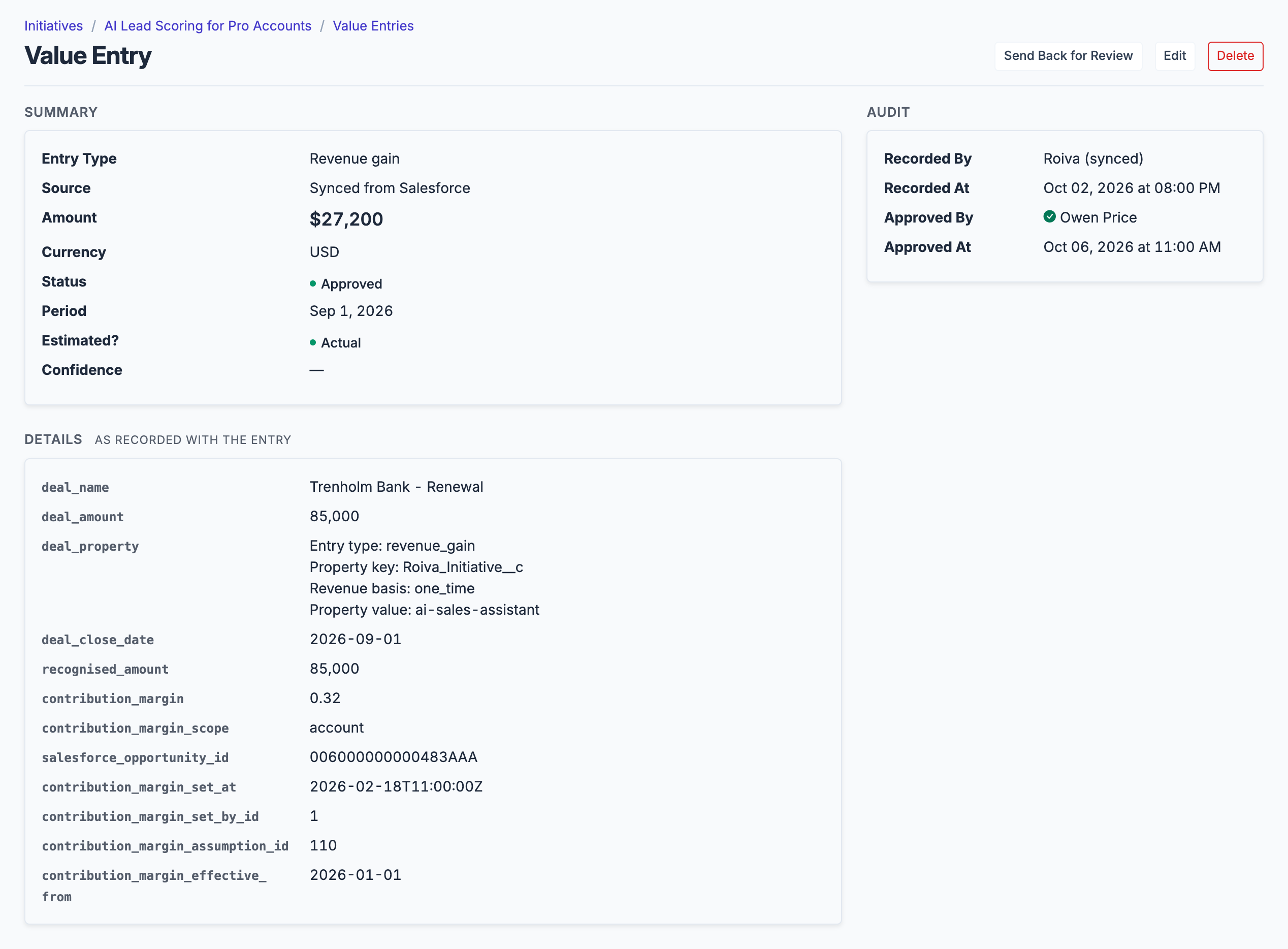
Each won opportunity is its own entry: the deal, the field that tied it to the initiative, the margin applied and who set it.
What gets synced
Roiva writes these metric observations on each sync. Reference the key in a value formula to use this data in your ROI calculations.
Opportunities
salesforce.opportunities.won_count
Won Opportunity Count
count
salesforce.opportunities.lost_count
Lost Opportunity Count
count
salesforce.opportunities.won_value
Won Opportunity Value
currency
salesforce.opportunities.win_rate
Win Rate
percentage
salesforce.opportunities.avg_sales_cycle_days
Avg Sales Cycle (days)
duration
salesforce.opportunities.avg_value
Average Deal Value
currency
salesforce.opportunities.open_count
Open Opportunity Count (snapshot)
count
salesforce.opportunities.open_value
Open Opportunity Value (snapshot)
currency
Cases
salesforce.cases.volume
Case Volume
count
salesforce.cases.closed_count
Closed Case Count
count
salesforce.cases.resolution_rate
Resolution Rate
percentage
salesforce.cases.avg_resolution_days
Avg Resolution Time (days)
duration
salesforce.cases.open_count
Open Case Count (snapshot)
count
What Roiva keeps
Reads: Opportunities and cases, all of them, and Messaging sessions from the last 12 months with the Omni-Channel work records that say who took each one, with only the fields the field-by-field table lists, plus any custom opportunity field named where it's linked as a value source. Never a case's subject or description, a conversation's messages, or a contact.
Keeps: Records of opportunities, cases and Messaging sessions, plus the totals worked out from them.
Common questions
Does Roiva cover Salesforce Agentforce, including its credits, licenses and actions?
How to connect
You connect Salesforce from inside Roiva, so you need a Roiva workspace first. Sign in to connect it now. New to Roiva? Start free with your work email, take the free assessment and create your workspace at the end, or request an invite.
- In Roiva: Click Continue to Authorize, and you're redirected to Salesforce to authorize. Sign in as the user Roiva should read as. That user needs the API Enabled permission and Read on Opportunities and Cases, and on Messaging Sessions and Agent Work if an initiative books the conversations an AI agent handled. Roiva counts only the records they can see, so an admin, or a user whose sharing covers the whole org, counts everything
- In Salesforce: If Salesforce refuses because the app isn't installed, a Salesforce admin opens Setup → Connected Apps OAuth Usage, finds Roiva's app and clicks Install, and then you connect again. Since September 2025 Salesforce lets people authorize only apps their org has installed, unless they have the Approve Uninstalled Connected Apps permission
- Back in Roiva: The connection page checks each step as that user and says what's missing. Once it's all ticked, click Test Connection
- Back in Roiva: After connecting, link this connection to an initiative on the Initiatives tab and select the object types relevant to your initiative
Need help?
Email hello@roiva.ai with what you're seeing, and you'll hear back within one business day.
Salesforce
Start free, then connect Salesforce once your workspace is set up. Or begin with the free AI ROI exposure assessment.
Start free → Sign in to connectRelated integrations