AI
OpenAI Codex
Roiva prices the developer time OpenAI Codex saves from the lines of code it wrote that your developers kept, read from ChatGPT Enterprise.
What it answers
How much developer time Codex gives back across your ChatGPT Enterprise workspace
What Roiva reads
Daily Codex totals for the workspace for the last 3 months. Roiva asks for workspace totals, so no developer is named in what comes back.
Setup
An admin key with Codex analytics permission, and your Workspace ID, from the ChatGPT Admin Console
What you can measure with OpenAI Codex
Developer time from kept lines
Lines Codex wrote that developers kept × minutes saved per line × your developer rate, as freed capacity. Roiva starts from half a minute a line until you set your own.
openai_codex.usage.lines_accepted
Starts from the AI Coding Assistant Rollout template
Lines are the weaker measure
Codex reports no acceptance count, so Roiva prices kept lines. A hard line and a trivial one count the same, which is why a time study of your own is worth more here than anywhere.
What the team committed
Lines committed and Codex turns by month, to see how much of what ships it wrote and whether the rollout took.
openai_codex.usage.lines_committed
openai_codex.usage.turns
Against what the workspace costs
ChatGPT Enterprise seats are the initiative's cost, from OpenAI's invoice or the bill in your books, so cash ROI sets them against the freed time once it becomes cash.
A worked month
Codex across a 40-person engineering team
Developer Capacity Freed by an AI Coding Assistant (by lines of code), from the AI Coding Assistant Rollout template, for September
| Lines Codex wrote that developers kept | 36,000 | OpenAI Codex |
| Minutes saved per line kept | 0.5 | Roiva's starting figure, until you set yours |
| Developer hourly rate, fully loaded | $94.50 | Roiva's default, until you set yours |
36,000 lines × 0.5 minutes × $94.50 ÷ 60
$28,350 freed capacity for September, reported beside cash ROI, never in it
An initiative whose assistant does count acceptances, like Copilot or Claude Code, gets the acceptances formula instead, never both, so the same time isn't counted twice.
Illustrative figures. Roiva keeps every input with the entry it calculates, and none of it counts until it's approved.
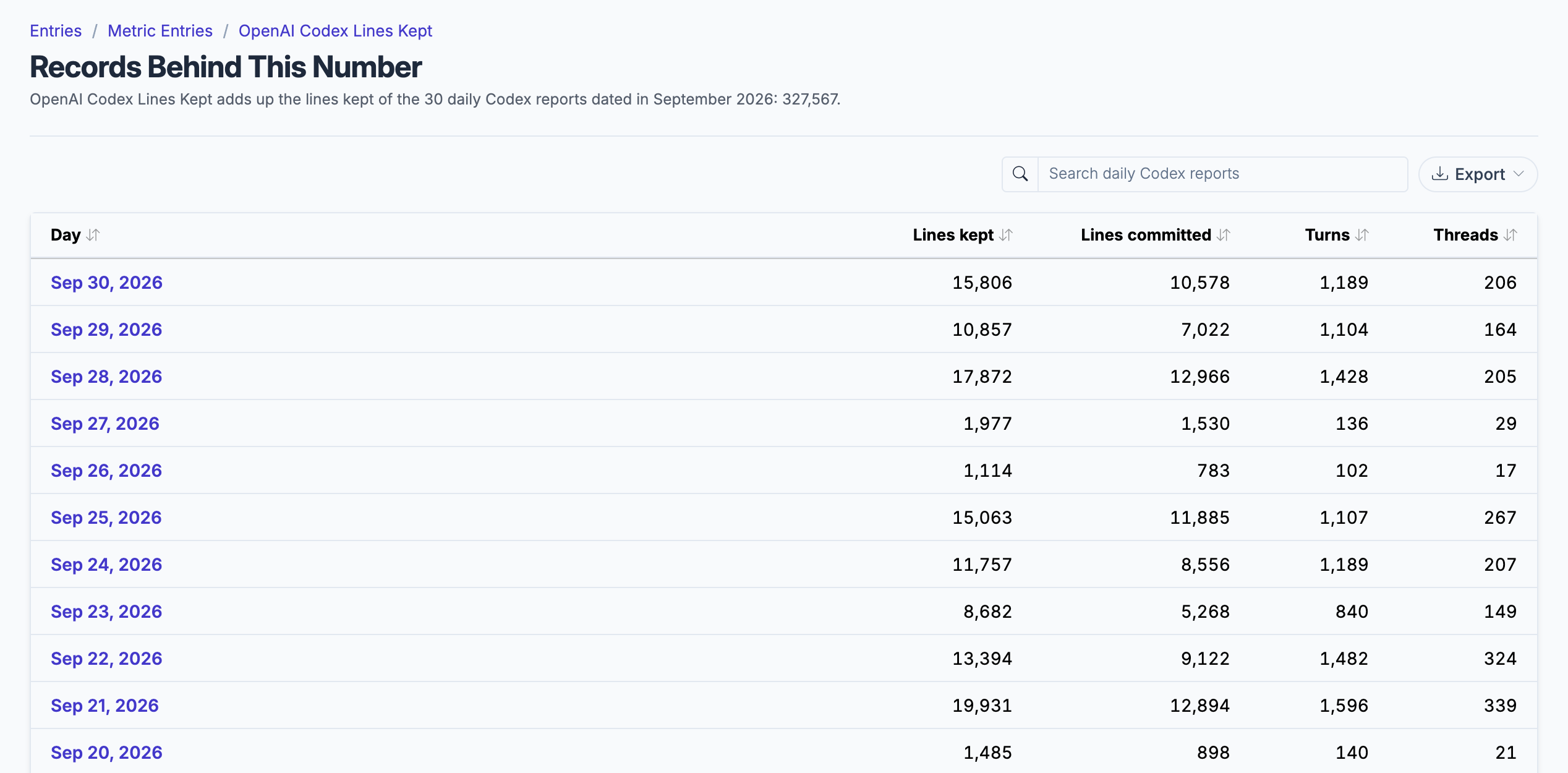
The daily Codex totals behind a month's lines kept, for the whole workspace.
What gets synced
Roiva writes these metric observations on each sync. Reference the key in a value formula to use this data in your ROI calculations.
Codex Activity
openai_codex.usage.lines_accepted
Lines of Code Kept
count
openai_codex.usage.lines_committed
Lines of Code Committed
count
openai_codex.usage.turns
Codex Turns
count
What Roiva keeps
Reads: Daily Codex totals for the workspace for the last 3 months. Roiva asks for workspace totals, so no developer is named in what comes back.
Keeps: Records of daily usage totals, plus the totals worked out from them.
How to connect
You connect OpenAI Codex from inside Roiva, so you need a Roiva workspace first. Sign in to connect it now. New to Roiva? Start free with your work email, take the free assessment and create your workspace at the end, or request an invite.
- In ChatGPT: Sign in to your ChatGPT Enterprise or Edu workspace as an owner or admin — Codex analytics are not available on Team or individual plans
- In ChatGPT: Open the Admin Console → API keys and create an admin key (starts with sk-admin-) with Codex analytics permission (codex.enterprise.analytics)
- In ChatGPT: Copy your Workspace ID from the Admin Console — it is a UUID, and it appears in the console's URL
- Back in Roiva: Paste the Workspace ID and the admin key here and save the connection
- Back in Roiva: The connection page checks each step and says what's missing. Once it's all ticked, click Test Connection, then link this connection to an initiative on the Initiatives tab
Need help?
Email hello@roiva.ai with what you're seeing, and you'll hear back within one business day.
OpenAI Codex
Start free, then connect OpenAI Codex once your workspace is set up. Or begin with the free AI ROI exposure assessment.
Start free → Sign in to connectRelated integrations