Finance
QuickBooks
Roiva books each AI vendor bill in QuickBooks to the initiative it pays for, at the share you set, and counts spend a direct connection also reports only once.
What it answers
Which AI vendor bills belong to which initiative, each booked once
What Roiva reads
Invoices, bills, purchases and bill payments, the monthly profit and loss, and the chart of accounts, classes and locations. Contact details aren't kept.
Setup
One OAuth approval in QuickBooks, by the Primary Admin or a Company Admin
What you can measure with QuickBooks
AI vendor bills, booked
Assign a vendor to an initiative, by exact name or a word in it, and an allocation rule books its bills, card and check expenses there as they sync.
quickbooks.bills.volume
A share of a shared bill
Book 20% of a Google Workspace bill to the initiative that pays for its Gemini seats. A changed share applies from the date you give, so nothing already booked moves unless you say so.
Booked once
A bill from OpenAI, Anthropic, GitHub or Snowflake that a rule books to an initiative isn't counted again by that initiative's own link to the platform, which steps aside in those months.
AP automation, priced
Bills received each month × the minutes per bill your time study saved × your AP labor rate, as freed capacity.
quickbooks.bills.count
Starts from the AI-Powered Invoice Processing template
A worked month
Two AI vendors on one support initiative
Vendor bills, booked from QuickBooks by allocation rule, for September
| Google Workspace bill, Gemini seats included | $6,000 | QuickBooks |
| Support initiative's share of the bill | 20% | Set on the allocation rule |
| Ada bill, booked in full | $2,400 | QuickBooks |
$6,000 × 20% + $2,400
$3,600 booked to the support initiative for September
The other 80% of the Workspace bill stays unassigned rather than spread across initiatives, and a locked month keeps what it booked when a share changes later.
Illustrative figures. Roiva keeps every input with the entry it calculates, and none of it counts until it's approved.
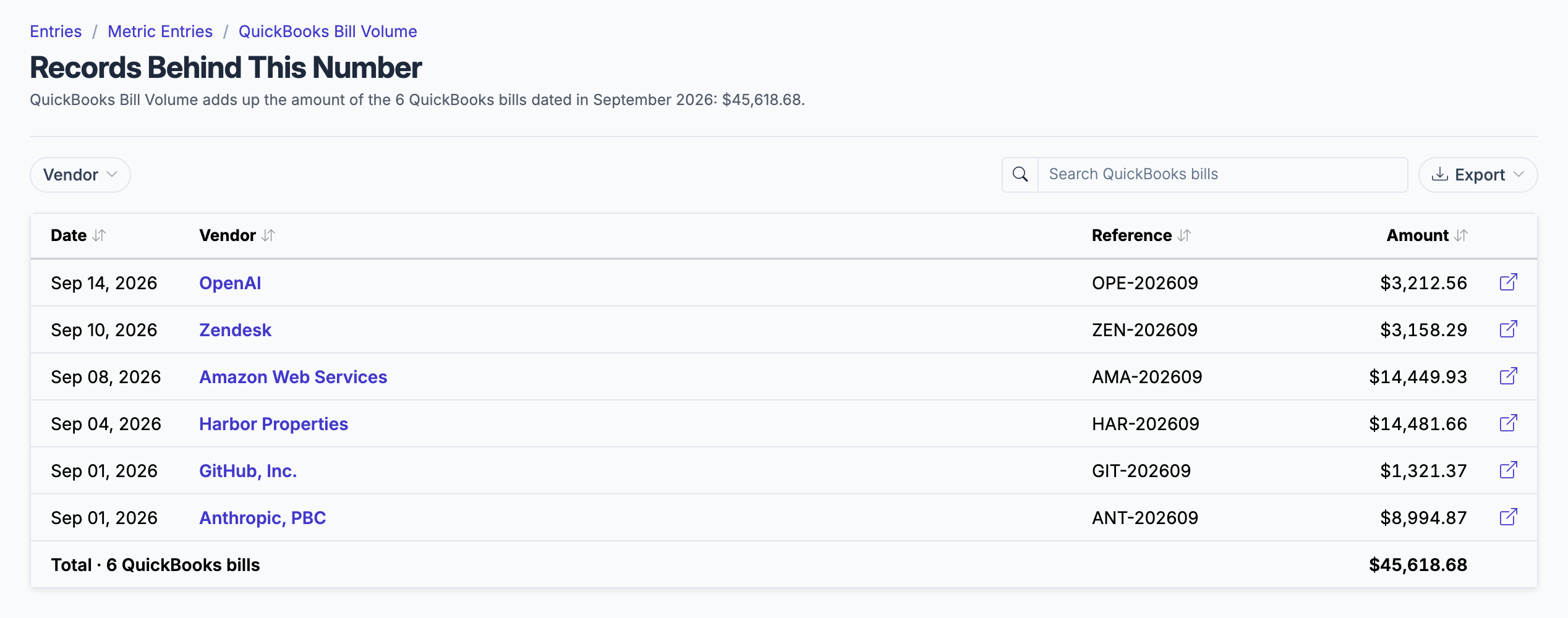
The bills dated in the month, by vendor, each a click from the bill in QuickBooks.
What gets synced
Roiva writes these metric observations on each sync. Reference the key in a value formula to use this data in your ROI calculations.
Financials
quickbooks.financials.revenue
Revenue
currency
quickbooks.financials.expenses
Expenses
currency
quickbooks.financials.net_income
Net Income
currency
Invoices (AR)
quickbooks.invoices.count
Invoice Count
count
quickbooks.invoices.volume
Invoice Volume
currency
quickbooks.invoices.paid_count
Paid Invoice Count
count
Bills (AP)
quickbooks.bills.count
Bill Count
count
quickbooks.bills.volume
Bill Volume
currency
What Roiva keeps
Reads: Invoices, bills, purchases and bill payments dated in the last 12 months, the profit and loss report for each of those months, and the chart of accounts, classes, locations and budgets. QuickBooks sends each document's contact details; Roiva keeps only the fields the field-by-field table lists.
Keeps: Records of invoices, bills, purchases, bill payments and profit and loss reports, plus the totals worked out from them.
How to connect
You connect QuickBooks from inside Roiva, so you need a Roiva workspace first. Sign in to connect it now. New to Roiva? Start free with your work email, take the free assessment and create your workspace at the end, or request an invite.
- In Roiva: Connect via OAuth — you will be redirected to Intuit to authorize with your QuickBooks account
- In QuickBooks: Sign in as the Primary Admin or a Company Admin, the only QuickBooks users who can connect an app
- After connecting, Roiva will sync 12 months of monthly Profit & Loss, invoices, bills, and card, check and cash expenses automatically
- Back in Roiva: The connection page checks each step and says what's missing. Once it's all ticked, click Test Connection
- Back in Roiva: To book its bills, open Finance › AI Spend and show the unbooked vendors. It lists the vendors on the synced bills and expenses that no initiative books, AI vendors first. Assign each to the initiatives it serves, which writes its allocation rule, or set it aside
- Back in Roiva: To count its invoices or Profit & Loss toward an initiative, link the connection to it on the Initiatives tab
Need help?
Email hello@roiva.ai with what you're seeing, and you'll hear back within one business day.
QuickBooks
Start free, then connect QuickBooks once your workspace is set up. Or begin with the free AI ROI exposure assessment.
Start free → Sign in to connectRelated integrations