Finance
Xero
Roiva books each AI vendor bill in Xero to the initiatives it pays for, splitting shared bills, and posts the journal back to Xero when you close the month.
What it answers
What each AI initiative costs on your books, and the journal that puts it there
What Roiva reads
Authorized and paid invoices and bills, spend-money transactions, the monthly profit and loss, and the chart of accounts and tracking categories. Contact details aren't kept.
Setup
One OAuth approval in Xero, by a user with the Standard or Advisor role
What you can measure with Xero
One bill, several initiatives
An allocation rule splits a vendor's bills between initiatives by weight, and every bill dated in its window is booked that way as it syncs.
xero.bills.volume
Journals back to Xero
When you lock a month, Roiva posts the reclass journal to Xero on your tracking category, from the accounts each bill hit, pro rata. Reopening the month reverses it.
AI vendor bills, booked
Assign a vendor to one initiative, by exact name or a word in it, at the share you set, and its rule books its bills there as they sync.
AP automation, priced
Bills received each month × the minutes per bill your time study saved × your AP labor rate, as freed capacity.
xero.bills.count
Starts from the AI-Powered Invoice Processing template
A worked month
An implementation partner's bill, split two ways
A vendor bill split by an allocation rule, and posted to Xero when September locks, for September
| Implementation partner's September bill | $24,000 | Xero |
| Support initiative's weight | 60% | Set on the rule |
| AP initiative's weight | 40% | Set on the rule |
$24,000 × 60%
$14,400 booked to the support initiative, with $9,600 to AP
When Finance locks September, Roiva posts one journal to Xero moving the bill out of the account it hit and into each initiative's tracking category, so the ledger says what Roiva says.
Illustrative figures. Roiva keeps every input with the entry it calculates, and none of it counts until it's approved.
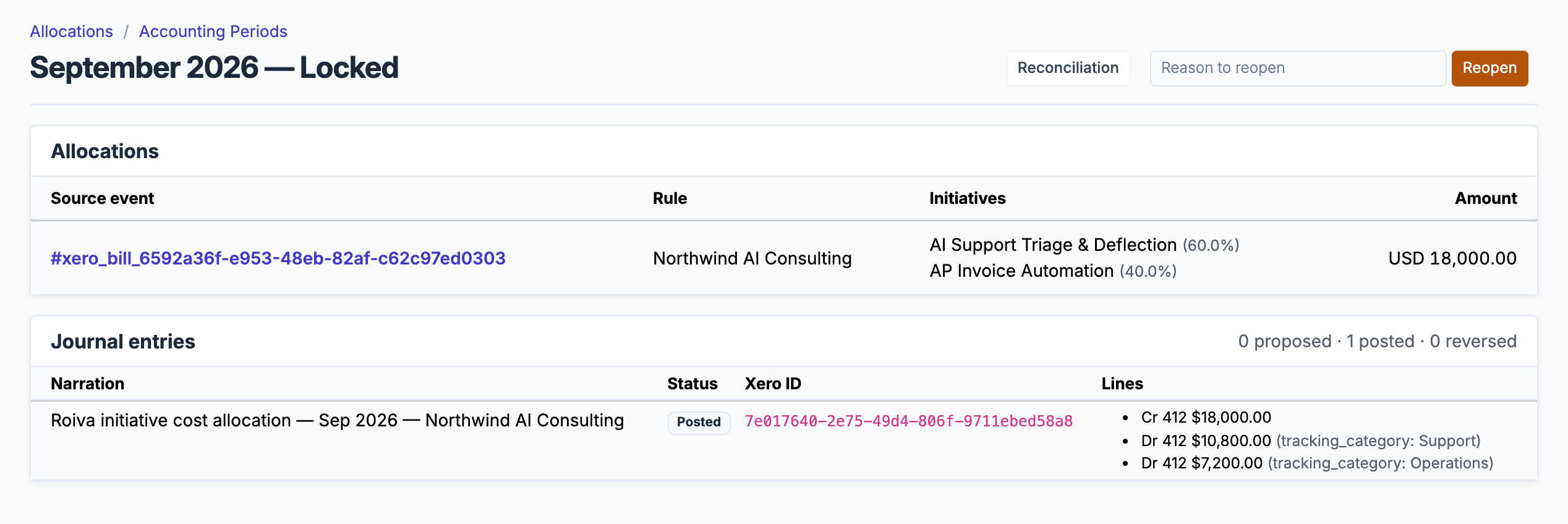
A locked month: the bill a rule split 60/40, and the journal Roiva posted to Xero for it, line by line.
What gets synced
Roiva writes these metric observations on each sync. Reference the key in a value formula to use this data in your ROI calculations.
Financials
xero.financials.revenue
Revenue
currency
xero.financials.expenses
Expenses
currency
xero.financials.net_income
Net Income
currency
Invoices (AR)
xero.invoices.count
Invoice Count
count
xero.invoices.volume
Invoice Volume
currency
xero.invoices.paid_count
Paid Invoice Count
count
Bills (AP)
xero.bills.count
Bill Count
count
xero.bills.volume
Bill Volume
currency
What Roiva keeps
Reads: Authorized and paid sales invoices and bills, and spend-money transactions, dated in the last 12 months; the profit and loss report for each of those months; and the chart of accounts, tracking categories and budgets. Xero sends each document's contact details; Roiva keeps only the fields the field-by-field table lists.
Keeps: Records of invoices, bills, spend-money transactions and profit and loss reports, plus the totals worked out from them.
How to connect
You connect Xero from inside Roiva, so you need a Roiva workspace first. Sign in to connect it now. New to Roiva? Start free with your work email, take the free assessment and create your workspace at the end, or request an invite.
- In Roiva: Connect via OAuth — you will be redirected to Xero to authorize
- In Xero: Sign in as a user with the Standard or Advisor role and allow access to your organization. Xero lists what Roiva asks for: to read your Profit & Loss, invoices, bills, bank transactions and chart of accounts, and to post manual journals, which Roiva does only when you lock a period
- Back in Roiva: If you allowed more than one organization, choose the one this connection reads. Roiva disconnects the others you just allowed, unless a Roiva connection already reads them
- After connecting, Roiva will sync 12 months of monthly Profit & Loss, invoices, bills, and card and bank spend automatically
- Back in Roiva: The connection page checks each step and says what's missing. Once it's all ticked, click Test Connection
- Back in Roiva: To book its bills, open Finance › AI Spend and show the unbooked vendors. It lists the vendors on the synced bills and expenses that no initiative books, AI vendors first. Assign each to the initiatives it serves, which writes its allocation rule, or set it aside
- Back in Roiva: To count its invoices or Profit & Loss toward an initiative, link the connection to it on the Initiatives tab
Need help?
Email hello@roiva.ai with what you're seeing, and you'll hear back within one business day.
Xero
Start free, then connect Xero once your workspace is set up. Or begin with the free AI ROI exposure assessment.
Start free → Sign in to connectRelated integrations