Finance
American Express
Roiva books the AI subscriptions people put on American Express cards, by merchant, from the statements you import, so seats reach their initiatives.
What it answers
What the AI tools people put on company cards cost, and which initiative each belongs to
What Roiva reads
Nothing: you upload statement files. Each row's cardholder name and address are dropped as the file is read, and the file itself isn't kept.
Setup
A CSV statement download from americanexpress.com, with the additional transaction details included
What you can measure with American Express
AI subscriptions, by merchant
Charges from AI merchants such as ChatGPT, Claude or Cursor are found by merchant and booked to the initiative a vendor mapping names, under the cost type it gives.
Statements that overlap
Upload each month as it closes. A charge already imported is updated rather than counted again, and the connection page warns when the latest statement is more than 45 days old.
Counted once beside your books
A statement bill from American Express in your books is left to the uploads on the dates they cover, so the same card spend isn't booked twice.
Past months as a baseline
Import older statements and the AI seats people were already paying for become the initiative's cost history.
A worked month
AI seats on three teams' cards
Card charges from AI merchants, booked from an imported statement, for September
| ChatGPT Team, 12 seats at $30 | $360 | Amex statement |
| Claude, 8 seats at $30 | $240 | Amex statement |
| Cursor, 6 seats at $40 | $240 | Amex statement |
12 × $30 + 8 × $30 + 6 × $40
$840 booked to the initiatives that use them for September
Payments to American Express aren't imported, only the charges, and a month with no statement uploaded yet shows no total rather than a short one.
Illustrative figures. Roiva keeps every input with the entry it calculates, and none of it counts until it's approved.
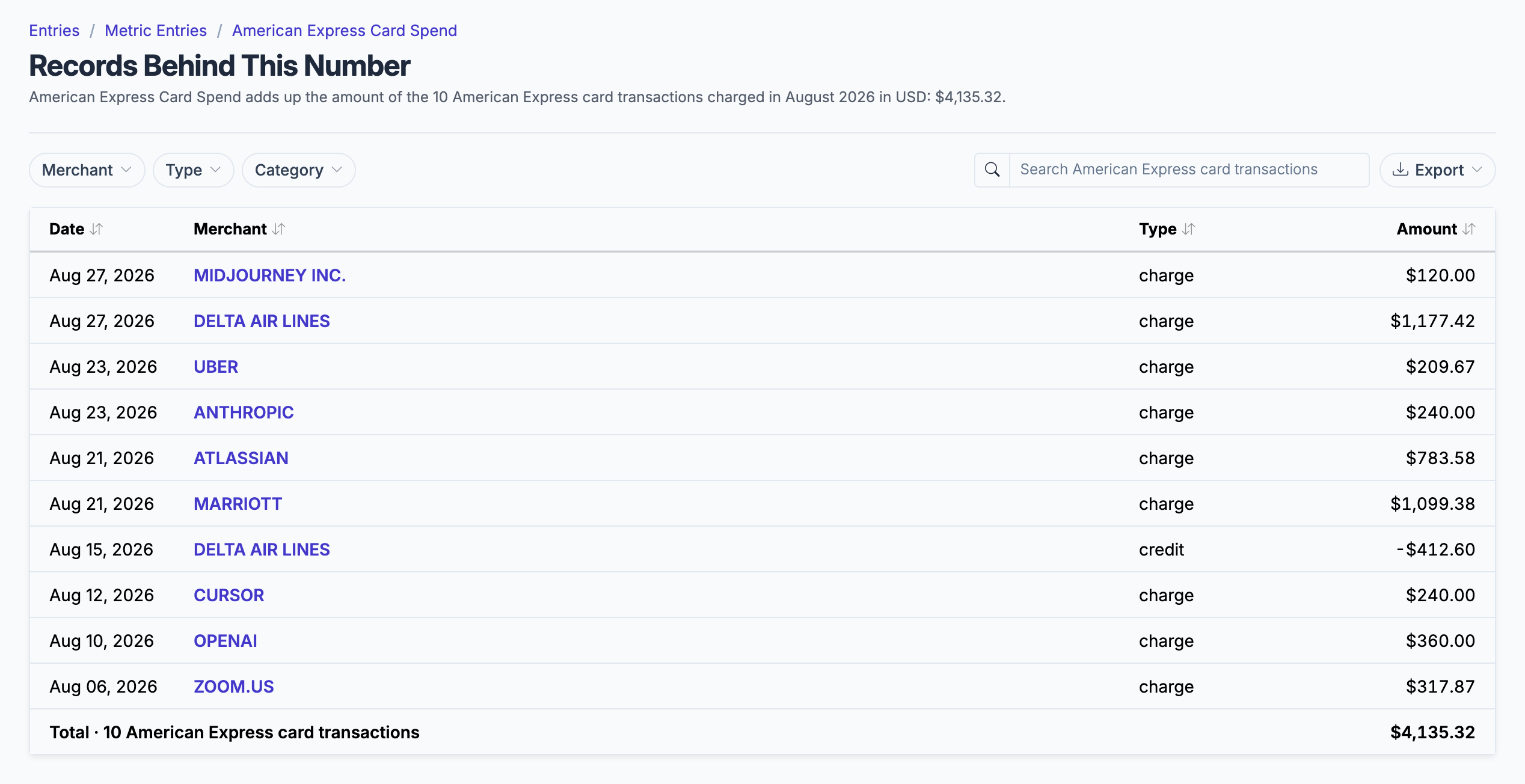
The card charges behind a month's card spend, by merchant, from an imported statement; the AI ones are booked to initiatives by mapping.
What an import records
Roiva writes these metric observations from the statements you import. Reference the key in a value formula to use this data in your ROI calculations.
Card Transactions
amex.card.spend
Total Card Spend
currency
What Roiva keeps
Reads: Nothing: you upload statement files. Each row's cardholder name and address are dropped as the file is read, and the file itself isn't kept.
Keeps: Records of card transactions, plus the totals worked out from them.
How to connect
You connect American Express from inside Roiva, so you need a Roiva workspace first. Sign in to connect it now. New to Roiva? Start free with your work email, take the free assessment and create your workspace at the end, or request an invite.
- In Roiva: Create the connection. There's nothing to authorize: statements arrive as files you upload
- At americanexpress.com: Open Statements & Activity, choose the dates, then Download. Choose CSV and tick Include all additional transaction details. Without the details, the file has no transaction reference, and Roiva can't tell a charge it has already counted from a new one
- Back in Roiva: Upload the file on the connection's page. Upload each month's statement as it closes. Files that overlap are fine: a charge already imported is updated, not counted again. The connection page checks what's imported and the dates it covers, and warns when the latest statement ends more than 45 days ago
- If your books also carry these charges, from a card feed into QuickBooks, Xero or NetSuite, or as one bill from American Express for each statement: the connection check names the account they're paid from, and Roiva counts those charges from your statements so each counts once. Enter it as Card account in your books on the connection's Edit page if the check finds the wrong account or none
Need help?
Email hello@roiva.ai with what you're seeing, and you'll hear back within one business day.
American Express
Start free, then connect American Express once your workspace is set up. Or begin with the free AI ROI exposure assessment.
Start free → Sign in to connectRelated integrations