
AI
Microsoft 365 Copilot
Roiva counts who uses the Microsoft 365 Copilot licenses you pay for, month by month, from Microsoft's own usage report, keeping no names.
What it answers
How many of the Copilot licenses you pay for are used each month, and the time the people using them get back on the tasks you timed
What Roiva reads
Microsoft's Copilot usage report, every night: a row per licensed user and the last day they used Copilot. Roiva swaps each name, or Microsoft's hash of it, for its own digest before anything is saved.
Setup
A Microsoft 365 admin signs in and consents to reading usage reports (Reports.Read.All)
What you can measure with Microsoft 365 Copilot
Time given back on the tasks you timed
People who used Copilot in the month × the timed tasks each does with it × the minutes your own time study found it saves × your blended rate, as freed capacity. Roiva supplies no tasks or minutes, so nothing is booked until your study sets them.
microsoft_365_copilot.users.monthly_active
Starts from the AI Assistant Rollout template
Licenses against use
Licensed users beside the people who used Copilot in the month, so seats nobody uses show up before the renewal. Reclaiming them lowers the cost; it isn't booked as value as well.
microsoft_365_copilot.seats.enabled_users
microsoft_365_copilot.users.monthly_active
Each use as its own initiative
To see which teams' use pays for the licenses, measure each use, such as support research or variance commentary, as its own initiative, each taking its share of the license by seats.
Starts from the Assistant for Support Research template
Against what the licenses cost
Copilot licenses are the initiative's cost, from Microsoft's bill in your connected books or a recurring cost, so cash ROI sets them against the freed time once it becomes cash.
A worked month
A Copilot rollout's month
Capacity Freed by an AI Assistant, from the AI Assistant Rollout template, for September
| People who used Copilot in the month | 150 | Microsoft 365 Copilot |
| Timed tasks per user a month | 20 | Your figure |
| Minutes per task without Copilot | 12 | Your time study |
| Minutes per task with Copilot | 7 | Your time study |
| Blended hourly rate, fully loaded | $50 | Your figure |
150 × 20 × (12 − 7) ÷ 60 × $50
$12,500 freed capacity for September, reported beside cash ROI, never in it
150 of 300 licenses used in the month. Only tasks your time study timed count, however often people use Copilot for anything else.
Illustrative figures. Roiva keeps every input with the entry it calculates, and none of it counts until it's approved.
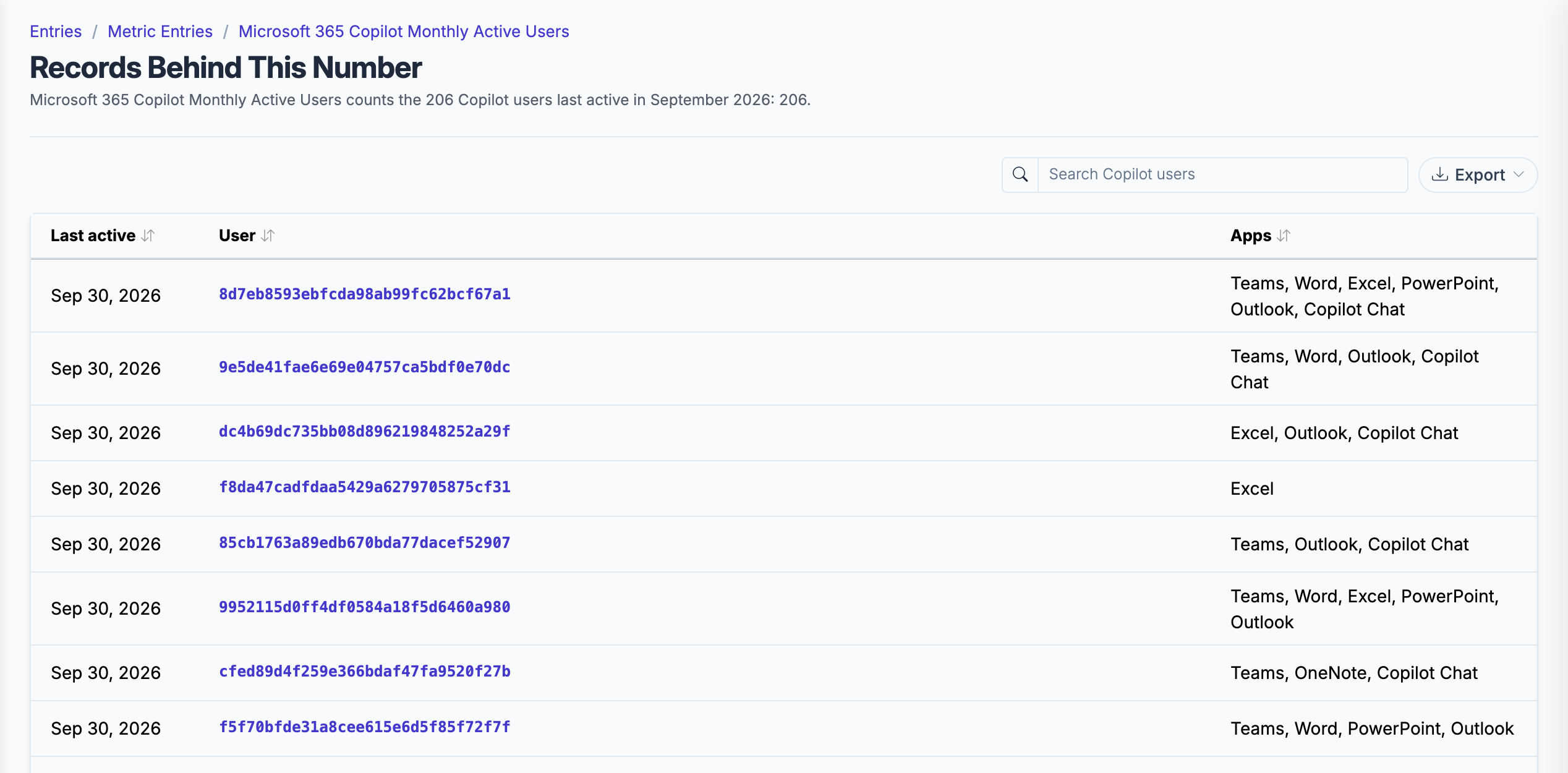
The users behind a month's active-user count, each a digest Roiva made, with no name or email kept.
What gets synced
Roiva writes these metric observations on each sync. Reference the key in a value formula to use this data in your ROI calculations.
Copilot Usage
microsoft_365_copilot.users.monthly_active
Monthly Active Copilot Users
count
microsoft_365_copilot.seats.enabled_users
Licensed Copilot Users
count
What Roiva keeps
Reads: Microsoft's Microsoft 365 Copilot usage report: a row per licensed user with their name (or Microsoft's hash of it, where names are concealed) and the last day they used Copilot in each app. Roiva replaces the name with its own digest before anything is saved.
Keeps: Records of Copilot license counts and Copilot users by month, plus the totals worked out from them.
How to connect
You connect Microsoft 365 Copilot from inside Roiva, so you need a Roiva workspace first. Sign in to connect it now. New to Roiva? Start free with your work email, take the free assessment and create your workspace at the end, or request an invite.
- In Roiva: Connect via OAuth — you will be redirected to Microsoft to authorize
- In Microsoft: Sign in as someone who may read usage reports — the Reports Reader or AI Administrator role, or an admin role such as Global, Exchange, SharePoint or Teams administrator. Global Reader and Usage Summary Reports Reader see only tenant totals, not this per-user report — and approve reading usage reports. Reports.Read.All always needs an admin's consent: if Microsoft says you need admin approval, a Microsoft Entra admin connects once and ticks the option to consent on behalf of your organization
- Back in Roiva: The connection page checks each step and says what's missing. Once it's all ticked, click Test Connection
- Back in Roiva: After connecting, link this connection to an initiative on the Initiatives tab
Need help?
Email hello@roiva.ai with what you're seeing, and you'll hear back within one business day.
Microsoft 365 Copilot
Start free, then connect Microsoft 365 Copilot once your workspace is set up. Or begin with the free AI ROI exposure assessment.
Start free → Sign in to connectRelated integrations