Finance
Stripe
Roiva books the revenue your AI product brings in from the Stripe customers you map to it, net of refunds and tax, at your margin, charge by charge.
What it answers
What revenue an AI product or feature brings in, from the customers who pay for it
What Roiva reads
Successful charges from the last 12 months with their customer, and every subscription. Stripe sends each customer's email and address; Roiva keeps only their name.
Setup
A restricted, read-only key from your Stripe Dashboard
What you can measure with Stripe
Revenue from the customers you map
Map the customers on an AI plan or add-on to the initiative, by name or customer ID, and each charge they pay is booked as it settles, at your contribution margin.
What you kept, not what you charged
Refunds come off, and so does the tax on the invoice or checkout session when the key can read them, so a charge books the revenue it actually brought in.
Subscriptions beside it
New and churned subscriptions and MRR by month, tracked against their baseline for a retention or upsell initiative.
stripe.subscriptions.new_count
stripe.subscriptions.churned_count
stripe.subscriptions.mrr
Never the whole account
A Stripe account is usually all of a company's revenue, so nothing books until you map customers, and until Finance sets a margin, mapped charges book nothing either.
A worked month
An AI add-on sold to existing customers
Charges from customers mapped to the initiative, net of refunds and tax, at margin, for September
| Eastgate Logistics, AI add-on | $1,499 | Stripe |
| Birchwood Health, AI add-on | $999 | Stripe |
| Alder Freight, AI add-on | $499 | Stripe |
| Tax on their invoices | 8% | Stripe invoices |
| Contribution margin | 60% | Set by Finance |
($1,499 + $999 + $499) × (100% − 8%) × 60%
$1,654.34 cash value for September, one entry for each charge
A charge refunded in full books nothing, and one refunded in part books what was kept. Customers on your other plans aren't mapped, so their revenue stays out.
Illustrative figures. Roiva keeps every input with the entry it calculates, and none of it counts until it's approved.
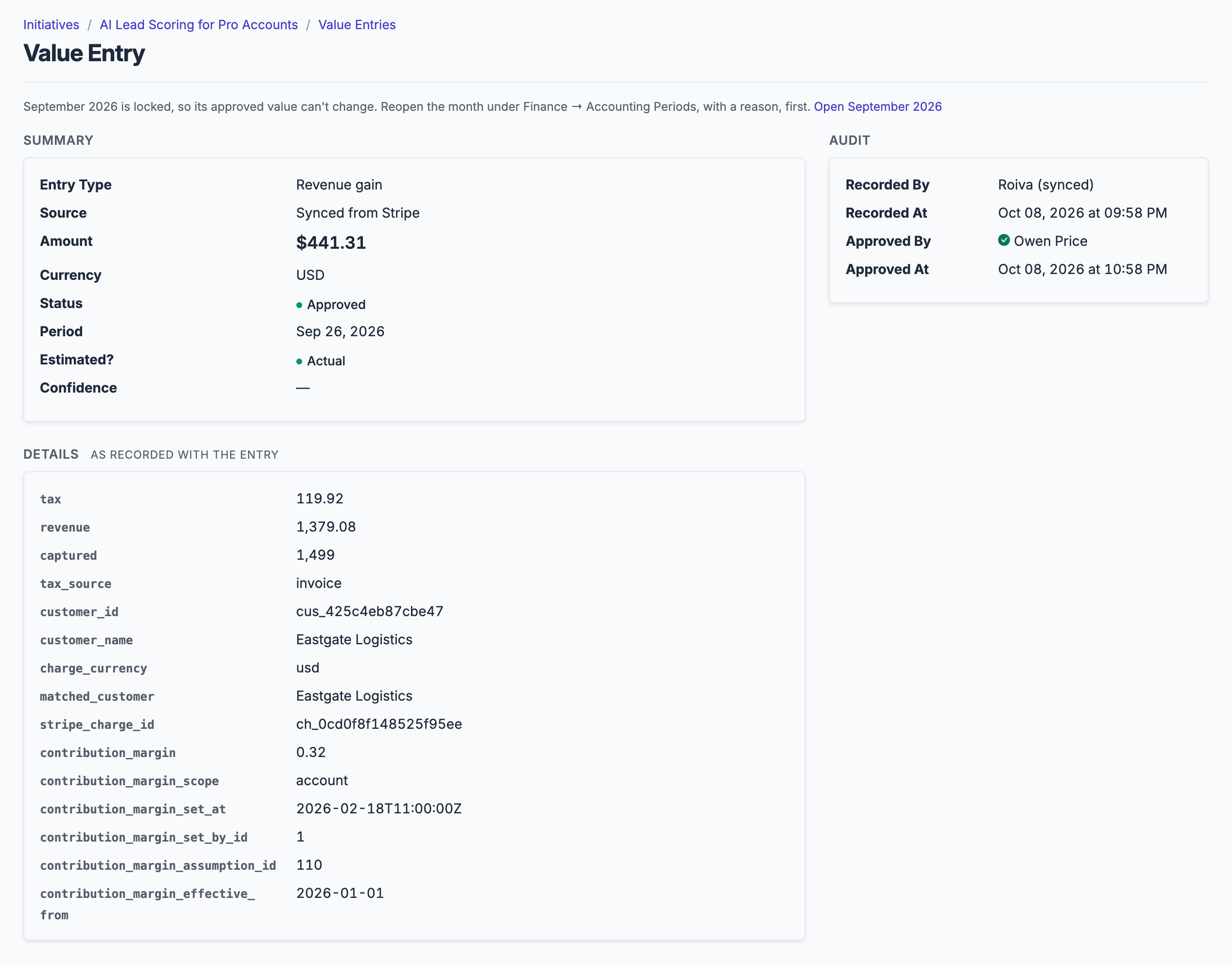
Each charge from a mapped customer is its own entry: captured, less the tax on its invoice, at your margin.
What gets synced
Roiva writes these metric observations on each sync. Reference the key in a value formula to use this data in your ROI calculations.
Charges
stripe.charges.volume
Charge Volume
currency
stripe.charges.count
Charge Count
count
Subscriptions
stripe.subscriptions.new_count
New Subscriptions
count
stripe.subscriptions.churned_count
Churned Subscriptions
count
stripe.subscriptions.mrr
MRR
currency
What Roiva keeps
Reads: Successful charges from the last 12 months, each with its customer; every subscription; and, to work out tax, the invoice payments and checkout sessions from the same months, which aren't kept. Stripe sends each customer's email and address; Roiva keeps only their name.
Keeps: Records of charges and subscriptions, plus the totals worked out from them.
How to connect
You connect Stripe from inside Roiva, so you need a Roiva workspace first. Sign in to connect it now. New to Roiva? Start free with your work email, take the free assessment and create your workspace at the end, or request an invite.
- In Stripe: Open Developers → API keys in your Stripe Dashboard (dashboard.stripe.com/apikeys), in live mode
- In Stripe: Click Create restricted key and set Read on Charges and Refunds and on Subscriptions (under Billing), the two things Roiva syncs, and Read on Accounts under Connect (not Accounts v2), so Roiva can tell which Stripe account the key belongs to and which currency it settles in. Also set Read on Invoices (under Billing) and on Checkout Sessions: the tax charged on a charge is on the invoice or Checkout Session it paid, and without them Roiva books charges tax and all. And set Read on Customers, so you can map charges to an initiative by customer name. Leave everything else at None. Copy the key when it appears: Stripe won't show it again
- Back in Roiva: Paste the key here and save the connection
- Back in Roiva: The connection page checks each step and says what's missing. Once it's all ticked, click Test Connection
- Back in Roiva: After connecting, link this connection to an initiative on the Initiatives tab and pick the customers whose charges are that initiative's revenue. With no customers mapped, it books nothing
Need help?
Email hello@roiva.ai with what you're seeing, and you'll hear back within one business day.
Stripe
Start free, then connect Stripe once your workspace is set up. Or begin with the free AI ROI exposure assessment.
Start free → Sign in to connectRelated integrations